


Best Servers for Small Business and Enterprise Networks

Today, a strong data infrastructure is essential for any organization’s success. No matter if you run a small creative agency or a large global company, your operations rely on network servers. These servers do more than store files. They manage user identities, host important applications, and act as the main hub for enterprise print server solutions.
Choosing the right server can feel overwhelming. You might need a small business server that fits in your office or a powerful enterprise server for a data center. The best choice depends on your workload, how much you plan to grow, and your budget, along with using platforms like Techimply to find software for efficient operations. In this guide, we’ll look at the best options from Direct Macro to help you create a strong network setup.
Understanding the Role of Network Print Servers
A network print server connects your printers to your computers using server technology. Rather than plugging a printer into just one computer, the print server links to your network through Ethernet or Wi-Fi. This setup lets any approved device on the network send print jobs to the printer.
For startups, servers for small business are often easy-to-use hardware devices. In larger companies, enterprise print server solutions use advanced management software to track usage, add security measures, and keep printing available at all times.
Why Your Business Needs a Dedicated Server?
A computer with server capabilities is designed for 24/7 operation. It has backup parts and uses error-correcting code (ECC) memory, which regular desktops do not have. In the workplace, networking servers handle several important tasks:
- Centralized Resource Sharing: They allow multiple users to access the same database and files simultaneously.
- Infrastructure Management: They host the enterprise print server, ensuring that hundreds of employees can print to a fleet of machines without bottlenecks.
- Enhanced Security: By centralizing data on server computers, businesses can implement stricter firewalls, backups, encryption, and solutions like Kyb for Small Businesses to verify partners and reduce fraud risks.
- Scalability: High-quality servers for small business are designed to grow with you, allowing for easy RAM and storage upgrades.
The Evolution: From Simple Hubs to Enterprise Print Server Solutions
In the early days of networking, a print server was just a small device that turned a parallel port into an Ethernet port. Now, things have changed. Hardware and software are coming together in new ways.
Small Business Needs
Smaller teams usually care most about keeping costs down and making setup easy. A small business server often handles both file storage and print management. These networking servers are are designed to be set and forget, requiring minimal IT intervention.
Enterprise Requirements
On the other hand, an enterprise server for printing needs to handle a high volume of printing and a wide range of printers. It should support multiple brands, manage permissions across various office locations, and integrate with Active Directory. More enterprise print servers now use cloud-hybrid models, so there is less need for on-site hardware, but still the control of a dedicated computer with server setup.
Further Reading:
Top 4 Best Network Servers for Small Business and Enterprise Networks
Choosing the right server is critical for performance. Moreover, businesses must also ensure their online visibility using SEO tools. Below are four top-tier options curated from Direct Macro store, ranging from compact hardware modules to strong server computers capable of managing massive print fleets.
1. HPE ProLiant ML350 Gen11 Tower Server
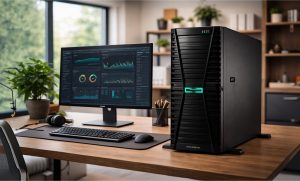
The ProLiant ML350 Gen11 is a premier enterprise server designed for those who need maximum performance in a tower form factor. It is ideal for high-volume enterprise print server solutions.
Specifications:
- Intel Xeon Scalable 4th Gen processors
- up to 8TB DDR5 memory
- 12 LFF or 24 SFF hot-plug drive bays
- PCIe 5.0 support
Reasons to Buy:
- Unmatched Power: Capable of handling massive databases and hundreds of simultaneous print jobs without any latency or system slowdowns.
- Future-Proof Design: Supports the latest DDR5 and PCIe 5.0 standards, ensuring your investment remains relevant for many years.
- Advanced Security: Features HPE’s Silicon Root of Trust, protecting your networking servers from firmware attacks and unauthorized hardware changes.
Reasons to Avoid:
- Physical Size: This is a large, heavy tower that requires significant floor space and proper ventilation to operate at peak efficiency.
- Complexity: Requires a skilled IT administrator to configure the advanced RAID settings and remote management features effectively.
- High Entry Cost: The advanced technology comes at a premium price, which may exceed the budget for micro-businesses.
2. IBM System x3200 M2 Tower Server (436834U)
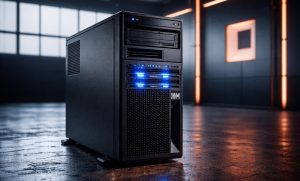
The IBM system x3200 M2 is a classic, dependable computer with server architecture built for small to medium-sized businesses needing an entry-level workhorse.
Specifications:
- Intel Xeon 3.00GHz Dual Core CPU
- 1GB DDR2 ECC RAM
- DVD-ROM
- integrated Gigabit Ethernet
- hardware RAID-0/1 support
Reasons to Buy:
- Reliable Legacy Support: Perfect for maintaining older business application modernization services that require a stable, dedicated small business server.
- Data Protection: Built-in hardware RAID ensures that your critical data remains mirrored and protected against disk failures.
Reasons to Avoid:
- Aged Specs: Standard memory is quite low for modern virtualization; it functions best as a dedicated single-role enterprise server.
- Manual Upgrades: To compete with modern networking servers, you will likely need to maximize the RAM immediately.
3. Dell PowerEdge T430 5U Tower Server (463-7032)
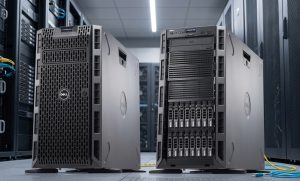
The Dell PowerEdge T430 is a high-performance enterprise server designed for versatility, silence, and massive scalability in professional office environments.
Specifications:
- Intel Xeon E5-2620 v3 Hexa-core (2.4GHz)
- 2-socket capable
- Up to 12 DIMM slots (DDR4)
- supports up to 16 hard drives
- 5U rackable tower
Reasons to Buy:
- Massive Scalability: Its 2-socket design and large drive capacity make it an ideal enterprise print server host for hundreds of users.
- Quiet Operation: Engineered for office use, providing the power of high-end server computers without disruptive noise.
Reasons to Avoid:
- Complex Management: Advanced features like iDRAC8 require an IT professional for optimal configuration.
- Physical Size: As a 5U tower, it takes up significantly more physical space than compact networking servers.
4. TerraMaster T9-423 9-Bay NAS Server
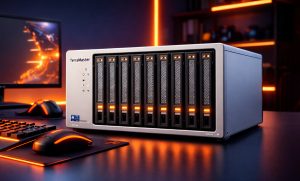
TerraMaster T9-423 9-Bay, the high-performance NAS is a specialized networking server optimized for businesses that prioritize lightning-fast data backup and file sharing.
Specifications:
- Intel Celeron N5095 Quad-Core (up to 2.9GHz)
- 8GB DDR4 RAM (expandable)
- dual 2.5GbE ports
- 9-bay storage capacity
Reasons to Buy:
- Fast Networking: Dual 2.5GbE ports provide high bandwidth, perfect for high-concurrent user access across a small business server network.
- Compact Power: Offers enterprise-level RAID and snapshot protection in a desktop-friendly size, ideal for servers for small business.
Reasons to Avoid:
- Specialized OS: Uses TerraMaster TOS, which differs from standard Windows or Linux server computers.
- CPU Focus: Highly efficient for storage and enterprise print server solutions, but less suited for CPU-heavy rendering.
How to Choose: Small Business vs. Enterprise
When looking for servers for a small business, focus on getting good value for your money and choosing something easy to use. If your team has about five people, a basic USB-to-Ethernet adapter from brands like dell or HP should be enough. These devices work as networking servers and need very little maintenance.
If you need an enterprise server, you should consider your overall print infrastructure. In this case, you are not just looking for a simple device, but a computer with enough power to act as a server, such as the Dell PowerEdge T430. An enterprise print server should be able to:
- Handle High Traffic: Imagine 200 people hitting Print on Monday morning. A small dongle will overheat or freeze; a dedicated server computer will queue those jobs efficiently.
- Provide Auditing: For legal or budgetary reasons, enterprises need to know who printed what and when. Enterprise print server solutions provide detailed logs.
- Ensure Redundancy: If your print server goes down in a law firm or a hospital, work stops. Enterprise setups often use failover clusters where a second server takes over if the first fails.
The Role of Software in Networking Servers
Hardware provides the foundation, while software drives functionality. Modern enterprise print server solutions typically use platforms such as PaperCut, PrinterLogic, or Windows Print Management.
When setting up a small business server, you can use the built-in Windows Server Print Management role to automatically deploy printers to users’ desktops. This eliminates the need for manual installation or entering IP addresses.
Organizations adopting modern enterprise print server models are increasingly turning to Cloud Print, which eliminates the need for local servers by moving the spooling process to the cloud. However, industries with high security requirements, such as finance or defense, often continue to use local servers to maintain data sovereignty.
Maintenance Tips for Your Network Print Servers
To keep your networking servers running at peak performance, follow these best practices:
- Static IP Addresses: Always assign a static IP to your print server. If the DHCP lease expires and the IP changes, every computer in the office will lose the printer.
- Driver Standardization: Use Universal Print Drivers (UPD) where possible. It reduces the size of the driver store on your enterprise server and prevents conflicts.
- Regular Spooler Clears: Occasionally, a corrupt print job can clog the server. Set a schedule to clear the print spooler or restart the service during off-hours.
- Firmware Updates: Just like your server computers, hardware print servers need firmware updates to patch security vulnerabilities.
Final Thoughts
Investing in the right network servers is a foundational step toward business maturity. Whether you opt for a compact small business server or a high-capacity enterprise server, centralizing your data and enterprise print server solutions will lead to better security and higher productivity. Explore the full range of server computers at Direct Macro to find the perfect fit for your growing network.
To receive swift and dependable assistance for all your computer parts requirements feel free to contact us at (855) 483-7810, get in touch with our specialized team by completing a submission form.
FAQ: Frequently Asked Questions
What is a network print server?
A network print server is a specialized computer with server capabilities or a hardware device that connects printers to a network, allowing multiple users to share printing resources efficiently.
What are the different types of print servers?
Types include internal cards for an enterprise print server, external hardware adapters, and software-based networking servers installed on server computers to manage high-volume enterprise print server solutions.
How do I find my network server?
To locate your small business server or print host, check the “Devices and Printers” settings on your computer with server access or run an IP scanner on networking servers.
What is the biggest advantage of network printing setup?
The primary benefit of enterprise print server solutions is centralized management. It allows an enterprise server to process multiple requests simultaneously, reducing the load on individual server computers.
What’s the difference between a print server and a printer?
A printer produces physical copies, while a network print server acts as the brain. It manages the queue on networking servers, ensuring the small business server distributes jobs correctly.
Categories


tags

Expert team support
We accept POs from fortune 1000 companies, government agencies, defense, schools and hospitals.
Do you need advice on buying or selling hardware? Fill out the form and we will return.

Sales & Support
(855) 483-7810
We respond within 48 hours on all weekdays
Opening hours
Monday to thursday: 08.30-16.30
Friday: 08.30-15.30



