


How to Find the Right Enterprise Drive Tray by Server Model

Key Takeaways
- The server model and generation, not the drive, determine which tray fits. A 5-inch SAS drive that works in a Dell PowerEdge R740 will not mount in an R730 without the correct-generation carrier.
- Enterprise drive tray compatibility rests on four variables: bay form factor (LFF or SFF), drive interface, hot-swap capability, and the OEM screw and latch pattern.
- The OEM part number stamped on an existing tray is the fastest and most reliable identifier. Pull one working tray, read the number, and buy to that number.
- HPE and Dell both changed carrier designs at generation boundaries (Gen8/Gen9 to Gen10 for HPE, and 13th to 14th Generation for Dell), so cross-generation reuse rarely works.
- A 3.5-inch tray plus a 2.5-inch adapter bracket is a legitimate way to run SSDs in an LFF bay, but it must be the OEM-matched bracket, not a generic one.
- Third-party and refurbished trays are fine for production use provided the latch mechanism, backplane clearance, and drive-presence sensing match the original carrier.
Why Enterprise Drive Tray Compatibility Matters
A drive tray, also called a caddy, carrier, or sled, is the metal-and-plastic frame that holds a hard drive or SSD and slides it into a server bay. It looks like a trivial accessory. In practice, it decides whether the drive seats squarely against the backplane connector, whether the chassis detects the drive, whether airflow reaches the drive at all, and whether you can replace a failed disk without powering the server down.
That is why the wrong tray is more expensive than it appears. In the mild case, the tray will not latch, and you notice immediately. In the expensive case, it latches, the drive registers, and the tray sits half a millimeter out of alignment. Hence, the drive drops off the SAS bus intermittently under thermal load, the RAID controller marks it as predictive-failure, and someone spends a day chasing a fault that is mechanical rather than electronic. System administrators who have replaced enough disks recognize this pattern; it is almost always a carrier problem or a backplane problem, not a drive problem.
The other cost is procurement waste. Drive trays are one of the highest-return-rate categories in server parts, and the reason is nearly always the same: the buyer matched the tray to the drive rather than to the server. The drive’s form factor tells you almost nothing on its own. The chassis is what defines the tray. Start from the server model every time.
Quick Answer: The Five-Step Identification Sequence
To identify the correct enterprise drive tray, confirm your server’s exact model and generation, check whether the bay is 3.5-inch (LFF) or 2.5-inch (SFF), match the drive interface (SAS, SATA, or NVMe), confirm whether the bay is hot-swap or fixed, then verify the OEM part number against an existing tray or the server’s documentation. Buy to the part number, not to the drive.
- Confirm the server model and generation from the service tag or chassis label.
- Establish the bay form factor, LFF 3.5-inch or SFF 2.5-inch.
- Match the interface: SAS, SATA, or NVMe / U.2.
- Confirm hot-swap versus non-hot-swap; hot-plug bays require a latching carrier.
- Verify the OEM part number stamped on an existing tray.
Step 1: Find Your Exact Server Model and Generation
“A Dell server” or “an HPE rack unit” is not enough information to buy a tray. You need the model and the generation, because both vendors revised carrier tooling between generations while keeping the outward appearance similar enough to defeat a visual check.
On Dell PowerEdge hardware, the service tag on the pull-out information tab at the front of the chassis, or the Express Service Code in iDRAC, resolves to the exact model. On HPE ProLiant hardware, the serial and product number on the chassis label resolve through HPE’s product lookup, and iLO reports the same values under System Information. On Lenovo ThinkSystem and Supermicro chassis, the machine type and model string on the front bezel or in XCC do the same job.
Record two things: the model string (for example, PowerEdge R740xd or ProLiant DL380 Gen10) and the generation. Everything downstream depends on those values. If you manage a mixed fleet, document this once in your asset inventory; most drive-tray purchasing errors trace back to someone assuming two racked servers of similar height are the same generation.
Step 2: Identify the Bay Form Factor (LFF vs. SFF)
Enterprise chassis ship in large form factor (LFF, 3.5-inch bays) and small form factor (SFF, 2.5-inch bays) configurations, and the same model number is frequently sold in both. A DL380 Gen10 exists as an 8-bay SFF and a 12-bay LFF; an R740 exists in SFF and LFF variants. The tray is not interchangeable between them.
Count the bays on the front of the chassis and note their proportions: 3.5-inch bays are visibly squarer and taller, 2.5-inch bays are narrow and usually appear in denser rows. If the server is remote, iDRAC or iLO lists the configuration under storage topology, and the original order documentation shows it too.
Running 2.5-inch SSDs in a 3.5-inch bay is a common and legitimate cross-case. It works, but only with the correct assembly: an LFF drive tray plus the OEM-matched 2.5-to-3.5-inch adapter bracket. Generic brackets frequently misalign the SSD’s connector by a millimeter or two, which is enough to cause intermittent detection. Where an OEM hybrid carrier exists for your generation, use it instead of assembling one.
Step 3: Match the Drive Interface
The tray itself carries no electronics on most SAS and SATA designs; the drive mates directly with the backplane. That means a SAS/SATA carrier is generally agnostic between the two interfaces, and an HDD caddy and an SSD caddy of the same form factor and generation are usually the same physical part.
NVMe is the exception that matters. NVMe and U.2 bays use different carriers on several platforms, sometimes with a distinct latch color or bezel to prevent mixing, because backplane lane assignment and drive power sequencing differ. If you are populating NVMe bays, treat the carrier as interface-specific and verify the part number against an NVMe-specific listing rather than assuming the SAS carrier will do.
Check the backplane itself as well. A tray will physically seat in an unsupported bay, and the drive still will not appear, because the vendor cabled that backplane to fewer ports than the bay count suggests. That is a configuration limit rather than a tray fault, and it is worth ruling out before ordering replacement carriers.
Step 4: Confirm Hot-Swap vs. Non-Hot-Swap
A hot-swap tray has a spring-loaded latch, a release button or lever, and usually an activity and fault LED light pipe molded into the bezel. A non-hot-plug carrier is a simpler bracket, often screwed into a fixed cage, with no latch and no light pipe. They are not substitutes: a non-hot-plug bracket in a hot-plug bay will not hold the drive against the connector under vibration, and the LEDs will not report drive state.
If your operational model depends on replacing failed disks without a maintenance window, the hot-swap tray is not optional. That requirement is why most buyers specify hot-plug bays in the first place. Confirm from the chassis: a hot-plug bay has a visible release mechanism on the carrier already installed. Tower and entry-level rack servers are the ones most likely to have fixed, non-hot-plug cages.
Step 5: Verify the OEM Part Number
This step removes the remaining ambiguity. Almost every OEM drive carrier carries a part number stamped, etched, or labeled on the tray body, usually on the inner face of the frame or the underside of the bezel. Pull one working tray from the chassis, read the number, and buy to that number.
If you cannot pull a tray, the same information appears in the server’s QuickSpecs (HPE) or owner’s manual and parts list (Dell), both of which list spare part numbers for drive carriers by chassis configuration. Cross-reference at least two sources before committing to a bulk order. Vendors frequently reuse part numbers across a generation family and occasionally supersede them, and a superseded number usually still fits.
When a supplier lists compatibility, read what they are actually claiming. “Compatible with R740” is a stronger statement than “fits 14th Generation,” and both are stronger than “universal server drive tray,” which in this category almost always means the tray fits nothing precisely.
HPE Drive Tray Identification by Generation
HPE ProLiant carriers changed meaningfully at the Gen10 boundary. Gen8 and Gen9 chassis share a carrier family, and the commonly listed spare numbers for that family are 651314-001 for 3.5-inch LFF trays and 651687-001 / 651699-001 for 2.5-inch SFF trays. Those numbers cover a wide span of DL360, DL380, ML350, and SL-series chassis. Gen10 and Gen10 Plus use a revised carrier with a different latch and bezel, so a Gen9 caddy will not serve a Gen10 bay even where the bay dimensions are identical.
HPE also produces smart carrier variants with additional status indication on some Gen10 configurations, so if your existing trays show a segmented LED ring rather than a single activity light, match that variant specifically.
Three HPE drive trays available at Direct Macro:
1. 651687-001 – HP 2.5-inch Hot Swap SAS / SATA Caddy for ProLiant G8, G9 and G10
The SFF hot-swap tray that most Gen8 and Gen9 ProLiant fleets run on, which Direct Macro also lists as fitting G10 bays.

651687-001 - HP 2.5-inch Hot Swap SAS / SATA Caddy for ProLiant G8 G9 and G10
- Price
- $51.00
- Brand
- HP
- Sku
- 651687-001
- Status
- Available
Specifications:
- Form Factor:5-inch SFF
- Interface: SAS / SATA
- Design: Hot-swap carrier with black bezel panel
- Compatibility: ProLiant DL160, DL320e, DL360e, DL360p, DL380e and DL380p
- Condition: Refurbished, tested
Reasons To Buy:
- Covers six ProLiant DL chassis in one part number, so a single SKU stock spares for most of a mixed HP fleet.
- The bezel panel keeps activity and fault LEDs working, so failed disks stay identifiable by indicator rather than by counting slots.
2. 371589-001 – HP 2.5-inch Hard Drive Tray for ProLiant Servers
An older ProLiant 2.5-inch drive carrier worth stocking when your fleet still runs chassis that the current Gen10 trays will not fit.

371589-001 - HP 2.5-inch Hard Drive Tray for ProLiant Servers
- Price
- $59.50
- Brand
- HP
- Sku
- 371589-001
- Status
- Available
Specifications:
- Form Factor:5-inch SFF
- Interface: SAS / SATA
- Compatibility:5-inch ProLiant server bays
- Condition: Refurbished, tested
Reasons To Buy:
- Stocking legacy carriers protects uptime on servers you cannot yet replace, avoiding the scavenging of trays from another running chassis.
- A straight 2.5-inch tray needing no adapter, so SFF drives seat directly against the backplane without extra brackets or alignment risk.
3. P14405-001 – HPE 2.5-inch Tray for MSA 2060
Array hardware needs carriers too; this HPE storage tray fits MSA 2060 enclosure bays rather than ProLiant rack server bays.

P14405-001 - HPE 2.5-inch Tray for MSA 2060
- Price
- $72.00
- Brand
- HPE
- Sku
- P14405-001
- Status
- Available
Specifications:
- Form Factor:5-inch SFF
- Platform: HPE MSA 2060 storage array
- Type: Drive carrier for array enclosure bays
Reasons To Buy:
- Array carriers rarely appear in general tray listings, so sourcing one from a stocked enterprise supplier saves a long hunt.
- Array bays fail the same way server bays do, so a shelf spare prevents a degraded enclosure waiting on procurement.
Dell Drive Tray Identification by Generation
Dell PowerEdge carriers group broadly into the 11th to 13th Generation family and the 14th Generation onward family. Suppliers commonly list older 3.5-inch carriers under F238F, G302D, X968D, and F9541, and they list the 2.5-inch carrier used across 14th Generation and later chassis (R440, R640, R740, R740xd, R940, and successors) as DXD9H. The 2.5-to-3.5-inch adapter brackets that let an SFF SSD sit in an LFF carrier appear as 9W8C4 and Y004G.
Dell’s push-button 2.5-inch R-series carrier is visually distinct from the older lever-release design, which gives you a quick field check. If the carrier releases with a button rather than a swing lever, you are on the newer family. Several Dell generations are externally near-identical at 1U and 2U, so the service tag remains the only reliable check.
Three Dell drive trays available at Direct Macro:
1. 85PPW – Dell 2.5-inch SAS / SATA Hot Swap Caddy for PowerEdge MX740c
If your estate includes modular MX blades or rugged XR2 units, this hot-swap Dell caddy covers all three platforms.

85PPW - Dell 2.5-inch SAS / SATA Hot Swap Hard Drive Caddy for PowerEdge MX740c
- Price
- $120.00
- Brand
- Dell
- Sku
- 85PPW
- Status
- Available
Specifications:
- Form Factor:5-inch SFF
- Interface: SAS / SATA
- Design: Hot-swap carrier
- Compatibility: PowerEdge MX740c, MX840c and XR2
- Condition: Refurbished, tested
Reasons To Buy:
- A single SKU spares three platforms, which keeps the parts list short when blade and edge hardware sit alongside rack servers.
- Modular and rugged platforms are the hardest trays to source locally, so securing spares early avoids long lead times later.
2. HC3DD – Dell 2x 2.5-inch Hard Drive Tray for PowerEdge R640
A dual-drive PowerEdge R640 tray for admins who need two SFF disks in the footprint of a single bay.
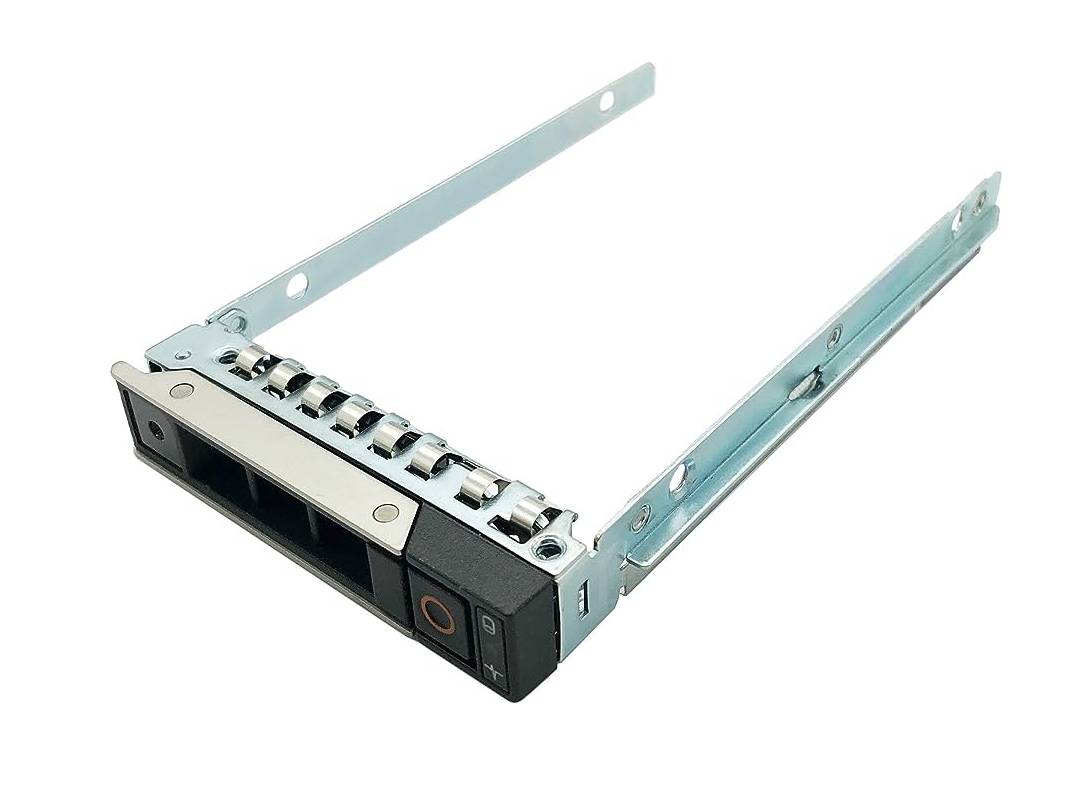
HC3DD - Dell 2x 2.5-inch Hard Drive Tray for PowerEdge R640
- Price
- $124.00
- Brand
- Dell
- Sku
- HC3DD
- Status
- Available
Specifications:
- Form Factor: Dual 2.5-inch SFF in a single carrier
- Interface: SAS / SATA
- Compatibility: PowerEdge R640
- Condition: Refurbished, tested
Reasons To Buy:
- Adds capacity without touching chassis wiring or backplane configuration, so the change stays inside a routine maintenance slot.
- Ideal for boot-drive pairs or cache tiers where two small SSDs matter more than a single large spinning disk.
3. 0TXJTP – Dell 3.5-inch SAS / SATA Hard Drive Caddy
The standard LFF Dell drive caddy, and the one most 3.5-inch PowerEdge bays need when a carrier goes missing.
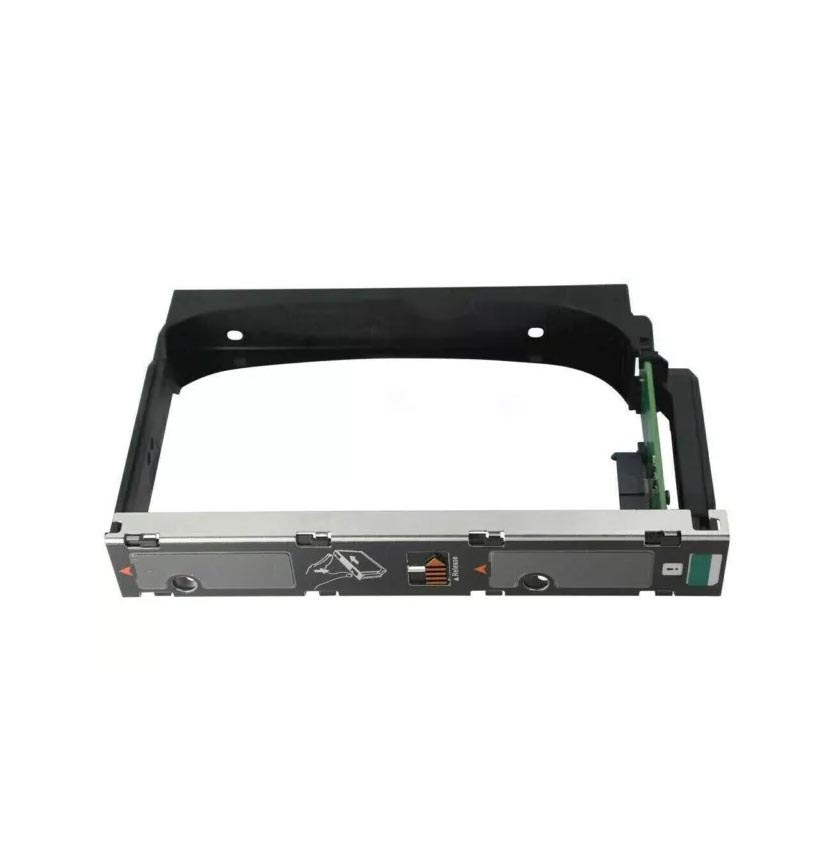
0TXJTP - Dell 3.5-inch SAS / SATA Hard Drive Caddy
- Price
- $76.50
- Brand
- Dell
- Sku
- 0TXJTP
- Status
- Available
Specifications:
- Form Factor:5-inch LFF
- Interface: SAS / SATA
- Type: Standard PowerEdge LFF drive carrier
Reasons To Buy:
- LFF bays outnumber SFF bays on capacity-tier PowerEdge builds, making this the tray storage-heavy Dell fleets consume fastest.
- Pairs with a 9W8C4 or Y004G bracket when you need to run a 2.5-inch SSD in a 3.5-inch bay.
Five Compatibility Mistakes That Cause Returns
Most drive-tray returns trace back to the same five errors, and each one takes under a minute to rule out. Check your order against them before you click buy.
- Matching The Tray to the Drive Instead of the Server: The drive’s form factor narrows the field but does not identify the carrier. The chassis does.
- Assuming A Generation Carries Forward: Both HPE and Dell revised carriers at generation boundaries. Similar-looking is not the same as compatible.
- Buying A “Universal” Drive Carrier: In enterprise chassis, there is no universal carrier. Latch geometry, screw pattern, and bezel depth are all model-specific.
- Using A Generic 2.5-To-3.5-Inch Adapter: Generic brackets misalign the connector enough to cause intermittent drive drops. Use the OEM-matched bracket.
- Ignoring Backplane and Controller Limits: A correctly fitted tray in an uncabled bay still shows no drive. Verify the backplane configuration before blaming the carrier.
Notice the pattern: four of the five start with an assumption about the server. Confirm the model, generation, and bay before ordering, and returns stop being part of the process.
Pre-Purchase Compatibility Checklist
Run this before every drive-tray order. If any row is unanswered, you are guessing.
| Check | Where to Find It | Why It Matters |
|---|---|---|
| Server model and generation | Service tag, chassis label, iDRAC / iLO | Defines the entire carrier family |
| Bay form factor (LFF / SFF) | Front of chassis, storage topology | 3.5-inch and 2.5-inch trays never interchange |
| Drive interface | Drive label, RAID controller inventory | NVMe / U.2 bays use interface-specific carriers |
| Hot-swap or fixed bay | Presence of latch and LED light pipe | Determines whether live replacement is possible |
| OEM part number | Stamp on existing tray, QuickSpecs, parts list | The single most reliable identifier |
| Screws and adapter bracket | Existing tray, kit contents | Trays often ship without screws or brackets |
| Backplane/port count | Server configuration documentation | Rules out non-tray causes of undetected drives |
Blanks, Dummy Trays, and Why Empty Bays Still Need Carriers
An empty bay is not a neutral state. Enterprise chassis rely on a sealed front-to-back airflow path, and every open bay bleeds cool air past the drive cage instead of pulling it through the components behind it. That is what blanks, also called dummy trays or filler carriers, exist to prevent. On a densely populated 24-bay SFF chassis, removing several carriers and leaving the bays open is enough to raise inlet temperatures and trigger fan ramp, which shows up as noise and power draw long before it shows up as a thermal event.
Blanks are model-specific in the same way live carriers are, and you identify them the same way: by server model, generation, and bay form factor. They are also the cheapest item in this category and the one most often missing from second-hand servers, so if you have bought used hardware, count the bays and count the carriers before the server goes into a rack. If a bay will be populated within days, a live tray is the better purchase; if it is staying empty for months, fit the blank.
One related detail worth knowing: some chassis report bay population state through the carrier rather than through the drive, so a bay fitted with the wrong filler can produce spurious inventory entries in iDRAC or iLO. If your management controller reports a drive slot you know is empty, check what is physically in the bay before investigating further.
How to Read a Drive Tray Listing Properly?
Once you know your model, generation, form factor, and part number, the last variable is what actually arrives. Drive-tray listings vary widely in what they include, and sellers rarely state the differences prominently. Confirm four things before ordering.
- Screws: Suppliers frequently sell trays bare, and HDD and SSD mounting screws are specific in length and shoulder profile, so a standard chassis screw will bottom out or fail to seat. Confirm screws are included or order them alongside.
- Adapter Bracket: If you intend to run 2.5-inch SSDs in a 3.5-inch bay, the bracket is a separate part on most platforms. Confirm whether the listed price includes it.
- Bezel and Light Pipe: On hot-swap carriers, the molded light pipe carries the activity and fault LEDs to the front face. A carrier with a missing or damaged light pipe still works electrically, but leaves you identifying failed disks by slot number instead of by indicator.
- Quantity and Condition: Multi-packs usually offer better value for a fleet, but confirm whether they are new, OEM refurbished, or third-party equivalent, and whether they come from the same production batch.
A listing that names the compatible server models, states the OEM part number, and itemizes what ships in the box is telling you the supplier understands the category. One that leads with “universal” and lists no part number is telling you something too.
Are Third-Party and Refurbished Trays Safe in Production?
Yes, with a caveat. A drive carrier is a mechanical part with no firmware and, on SAS and SATA designs, no active electronics. A refurbished OEM tray that latches correctly and holds the drive flush against the backplane performs identically to a new one, which is why large fleets buy refurbished carriers as standard practice and reserve budget for the drives themselves.
The caveat is sourcing. What separates a good third-party or refurbished carrier from a bad one is whether the latch geometry, bezel depth, screw pattern, and light-pipe alignment match the original. Buy from a supplier that lists compatibility by server model and generation rather than by broad claims, and that supplies screws and adapter brackets with the tray. If you are ordering in volume, order one first and test it in the target chassis before committing.
If you are building a spares kit, keep two or three carriers per chassis family on the shelf rather than one per server. Carrier failures are rare, but a snapped latch during an out-of-hours disk replacement is the kind of thing that turns a fifteen-minute job into a next-day job. Browse the full drive trays and caddies range and related storage accessories to match carriers to the generations you actually run.
Final Thoughts
Enterprise drive tray compatibility is not a difficult problem. Still, it is an unforgiving one: the answer is either exactly right or it does not work, with very little useful middle ground. The sequence that gets you there reliably is the same every time: establish the server model and generation, establish the bay form factor, establish the interface, confirm hot-swap capability, then verify against the OEM part number. Four of those five answers sit on the chassis itself, and the fifth appears on a tray already in the server.
Document the results for each chassis family in your fleet once, and drive-tray procurement stops being a recurring source of returned parts and half-finished maintenance windows.
Know your server model and generation? Browse compatible drive trays filtered by HPE and Dell platform, or explore the wider Storage Accessories range for adapter brackets, screws, and backplane spares. Request your bulk quote today.
Frequently Asked Questions
- Are HDD caddy and SSD caddy trays the same part?
For SAS and SATA bays, yes: the same server drive tray holds either drive, provided form factor and generation match your chassis.
- Will an HPE drive tray fit a Dell server?
No. HPE drive tray and Dell drive tray latch geometry and screw patterns differ entirely, so cross-vendor server compatibility never works.
- Can I reuse a hot-swap tray across server generations?
Rarely. Both vendors revised hot-swap tray designs at generation boundaries, so verify the drive carrier part number against your exact model.
- How do I check enterprise drive tray compatibility without opening the server?
Use iDRAC or iLO to read the model, generation, and storage topology, then match the OEM carrier part number from vendor documentation.
Categories


tags

Expert team support
We accept POs from fortune 1000 companies, government agencies, defense, schools and hospitals.
Do you need advice on buying or selling hardware? Fill out the form and we will return.

Sales & Support
(855) 483-7810
We respond within 48 hours on all weekdays
Opening hours
Monday to thursday: 08.30-16.30
Friday: 08.30-15.30



