


Server Memory Buying Guide: DDR4 vs DDR5 ECC RAM

Key Takeaways
- DDR4 ECC RAM remains the best value choice for existing Xeon Scalable (1st to 3rd Gen) and EPYC Rome/Milan servers; the platform, not preference, determines the generation.
- DDR5 ECC RAM roughly doubles usable bandwidth and adds on-die ECC and two independent 32-bit sub-channels per DIMM, which matters most for virtualization, in-memory databases, and AI inference.
- DDR4 and DDR5 server DIMMs are physically and electrically incompatible. They use different keying (1.2V versus 1.1V) and on-DIMM power management, so you cannot mix generations within a single server.
- ECC memory is non-negotiable for enterprise systems: it silently corrects single-bit errors instead of letting them corrupt data or crash a hypervisor.
- Populate channels evenly and match rank, speed, and voltage across all server RAM in a socket; a mismatched memory upgrade downclocks the entire bank.
- Refurbished, tested enterprise memory is the fastest way to expand a DDR4 fleet at low cost; save spending on new DDR5 for platforms that can actually use it.
Choosing server RAM used to be simple: match the speed, match the capacity, done. Then DDR5 arrived, and every refresh cycle now presents a genuine fork in the road. Do you keep feeding a proven DDR4 platform, or pay the premium for DDR5 ECC RAM and the bandwidth headroom that comes with it? This server memory guide walks through what actually changes between the two generations, how ECC memory protects your workloads, which server DIMMs fit which sockets, and how to plan a memory upgrade that does not leave your budget stranded on a dead-end platform.
Why ECC Memory Matters in a Server?
Cosmic rays, electrical noise, and thermal stress flip the occasional bit in every DRAM chip. On a desktop, that flip can cause a random crash or a corrupted file, and you reboot. On a database node or a hypervisor, it can write a silently incorrect number to disk, and no log entry tells you what happened.
ECC memory closes that gap. Each rank includes an extra DRAM chip, and a parity algorithm checks every read, corrects single-bit errors on the fly, and detects multi-bit errors before they spread. Your workload keeps running, and your data stays intact.
Reporting matters just as much as correction. ECC server DIMMs log every corrected error to the BMC, allowing you to identify the failing module and replace it during a planned maintenance window. That log turns a memory failure into a ticket rather than an outage, which is why every mainstream server platform requires ECC memory and why a Xeon or EPYC socket refuses to train non-ECC desktop sticks.
DDR4 ECC RAM: Where It Still Wins
DDR4 launched in 2014 and has matured over the past decade, which explains why it still accounts for the largest share of enterprise memory shipments today. Registered DDR4 modules run at 1.2V, are available in capacities from 8GB to 128GB, and top out at DDR4-3200 (PC4-25600). A huge installed base runs on it: Intel Xeon E5 v3 and v4, 1st through 3rd Gen Xeon Scalable, and AMD EPYC Naples, Rome, and Milan.
Three practical advantages keep DDR4 relevant. Cost per gigabyte is a fraction of DDR5’s, especially on the secondary market. The supply of tested modules lets you fill a 24-DIMM dual-socket chassis this week instead of next quarter, and a part such as the HP P22322-88M 16GB DDR4-3200 RDIMM ships from stock rather than on backorder.
Capacity beats bandwidth on most of these platforms as well. A virtualization host running sixty modest VMs gains far more from a jump from 256GB to 512GB than from a bandwidth bump it will never saturate. So, if your fleet already runs DDR4, max out the memory the sockets support and reserve the replatform budget for the workloads that genuinely need it.
DDR5 ECC RAM: What Actually Changed
DDR5 does more than raise the clock. Each DIMM now carries two independent 32-bit subchannels, so a single module can handle two requests at once and keep a high-core-count CPU fed. Base speeds start at DDR5-4800, and registered enterprise parts such as the Samsung M321R4GA3PB0-CWMRF 32GB DDR5-5600 RDIMM push beyond that, roughly doubling per-socket bandwidth compared with late DDR4.
The electrical design changed as well. Voltage drops to 1.1V, and an on-module PMIC takes over power management from the motherboard. That shift enables tighter power regulation and also explains why a DDR5 module never fits in a DDR4 slot, even though both use 288 pins. DDR5 adds on-die ECC, which protects the internal DRAM array, but it does not replace full ECC: registered DDR5 ECC RAM still includes the link-level ECC your server needs for reporting and correction across the bus.
So where does the extra bandwidth earn its premium? In-memory analytics, large-scale virtualization, AI inference serving, high-frequency trading, and any workload whose cores are currently waiting on memory. On the 4th- and 5th-Gen Xeon Scalable or EPYC Genoa and Turin platforms, the question never arises because those sockets accept nothing else.
DDR4 vs DDR5 ECC RAM: Side-by-Side Comparison
| Specification | DDR4 ECC RAM | DDR5 ECC RAM |
|---|---|---|
| Typical speeds | 2133 to 3200 MT/s | 4800 to 6400 MT/s |
| Voltage | 1.2V | 1.1V |
| Channel design | One 64-bit channel per DIMM | Two 32-bit sub-channels per DIMM |
| Error correction | Link ECC (RDIMM/LRDIMM) | Link ECC plus on-die ECC |
| Module capacity | 8GB to 128GB | 16GB to 256GB and above |
| Power management | On motherboard | On-DIMM PMIC |
| Cost per GB | Low; strong used supply | Premium |
| Platforms | Xeon E5 v3/v4, Xeon Scalable 1 to 3, EPYC Naples to Milan | Xeon Scalable 4 to 5, EPYC Genoa/Turin |
| Best for | Capacity-led consolidation, budget refreshes | Bandwidth-bound and AI/analytics workloads |
The table makes the choice seem binary, but in practice the socket decides for you: generation is a platform question first, a performance question second.
How to Choose Server RAM in Six Steps?
Six checks stand between you and a clean memory upgrade. Work through them in order before adding anything to a cart.
Step 1: Identify Your Platform
Check your server model and CPU generation in the vendor’s Quick Specifications. That lookup confirms whether DDR4 or DDR5 is supported, the speed ceiling, and supported module types.
Step 2: Confirm the DIMM Type
RDIMM, LRDIMM, and UDIMM are not interchangeable. Most rack servers accept only registered modules, so verify the module type before ordering.
Step 3: Size Capacity Per Channel
Divide your target capacity by the channel count. An even population delivers full bandwidth, while an odd configuration wastes bandwidth on every socket.
Step 4: Match Speed, Rank, and Voltage
When server DIMMs are mixed, they all run at the slowest common speed, so a single 2400 MT/s module downclocks the entire 3200 MT/s bank.
Step 5: Check the Population Rules
Two DIMMs per channel often reduce the rated speed by one tier, so fewer, larger modules usually outperform more, smaller ones.
Step 6: Decide New or Refurbished
Give tier-one production nodes new modules. Route lab, backup, and scale-out capacity to tested, refurbished memory, where savings compound fastest.
Follow these six steps, and your memory upgrade lands right the first time, with full bandwidth and no compatibility issues.
RDIMM, UDIMM and LRDIMM: Server DIMMs Explained
Registered DIMMs (RDIMMs) place a register between the memory controller and the DRAM chips. That register reduces the electrical load, allowing the controller to drive more modules per channel without compromising signal integrity. Almost every rack and blade server ships with RDIMMs as standard, and most vendors support no other memory.
Unbuffered ECC DIMMs (UDIMMs) skip the register entirely. They cost less and slightly reduce latency, but they connect directly to the controller, which limits how many you can install. Entry-level towers and workstations accept them; a two-socket rack server generally will not.
Load-reduced DIMMs (LRDIMMs) buffer both the address and data lines, increasing capacity per socket more than any other module type. You pay a small latency penalty for that buffer, so reserve LRDIMMs for four-socket hosts and memory-hungry virtualization clusters that need every gigabyte. Earlier four-socket platforms solved the same problem with fully buffered ECC memory, which placed a buffer chip on every module.
One rule covers all three: never mix them in the same server. The controller trains on a single topology, so a mismatched module usually causes the host to stop before POST completes.
New vs Refurbished Enterprise Memory
Memory has no moving parts. A module that passes a full read-and-write validation sweep behaves exactly like a new one, which is why refurbished server memory is a serious budget lever. You can often double a DDR4 host’s capacity for the price of a single new DDR5 kit.
Split your purchases by risk tier. Choose new server memory for production databases and hypervisor nodes under warranty scrutiny, and route refurbished modules to dev, test, backup targets, and scale-out capacity, where a swap costs you only time.
Vet the supplier either way. Insist on a vendor that tests every module, publishes the exact manufacturer part number, and backs the sale with a written warranty. Here is how the two options compare in practice:
| Factor | New Enterprise Memory | Refurbished Enterprise Memory |
|---|---|---|
| Cost per GB | Full market price | Typically 40 to 70 percent lower |
| Availability | Lead times on current DDR5 parts | In stock across DDR3 and DDR4 |
| Legacy part supply | Often end of life | Strongest source for older part numbers |
| Warranty | Full manufacturer term | Supplier warranty, commonly 1 to 3 years |
| Testing | Factory validated | Full read and write sweep on every module |
| Best fit | Tier-one production and new DDR5 nodes | Development, testing, backup, and DDR4 capacity growth |
Direct Macro’s full server memory range covers every generation from DDR3 through DDR5, filtered by capacity, rank, bus speed, and error correction so that you can match an existing part number in a couple of clicks.
Top 10 HP Server Memory Parts
If you are running HPE ProLiant hardware, these are ten HP ECC server DIMMs worth considering for a DDR4 memory upgrade. All ten are registered modules with capacities from 8GB to 64GB and speeds from 2133 to 3200 MT/s:
1. P0001153-001: HP 64GB DDR4-2133 ECC Registered RDIMM

P0001153-001 - HP 64GB DDR4-2133MHz PC4-17000 ECC Registered CL15 RDIMM 288-Pin 1.2V Quad Rack x4 Memory Module
- Price
- $411.00
- Brand
- Attribute not found
- Sku
- P0001153-001
- Status
- Available
P0001153-001 carries the highest capacity on this list, so one module frees seven slots for later expansion.
Specifications:
- Capacity: 64GB
- Speed: DDR4-2133 (PC4-17000)
- CAS latency: CL15
- Rank and Organization: Quad rank x4
- Form Factor: 288-pin RDIMM, 1.2V
- Error Correction: ECC registered
Market Value: At 64GB per module, this is the highest-density part on the list, and its cost per gigabyte undercuts the cost of buying four 16GB DIMMs.
Reason to Buy: Buy this if you want the most memory from the fewest slots. Eight modules give you 512GB and still leave half the slots empty for later.
2. 879149-001: HP 32GB DDR4-2133 ECC Registered RDIMM
879149-001 - HP 32GB DDR4-2133/PC4-17000 RDIMM 288-Pin CL15 Dual Rank x4 ECC Registered Memory Module
- Price
- $312.00
- Brand
- HP
- Sku
- 879149-001
- Status
- Available
879149-001 is the workhorse 32GB module for Gen9 ProLiant fleets that still run happily at 2133 MT/s.
Specification:
- Capacity: 32GB
- Speed: DDR4-2133 (PC4-17000)
- CAS latency: CL15
- Rank and Organization: Dual rank x4
- Form Factor: 288-pin RDIMM, 1.2V
- Error Correction: ECC registered
Market Value: Listed at $282.00, close to $8.80 per gigabyte, which makes it the cheapest way to reach 32GB density on a 2133 platform.
Reason to Buy: Buy this if your Gen9 or Xeon E5 v4 server runs at 2133 MT/s and you want to double the memory in each slot at the lowest price.
3. L15417-501: HP 32GB DDR4-2933 ECC Registered RDIMM
L15417-501 - HP 32GB DDR4-2933/PC4-23400 RDIMM 288-Pin CL21 Dual Rank x4 ECC Registered Memory Module
- Price
- $0.00
- Brand
- Attribute not found
- Sku
- L15417-501
- Status
- Available
L15417-501 doubles capacity while matching Cascade Lake’s native 2933 speed, so nothing downclocks anywhere in the bank.
Specifications:
- Capacity: 32GB
- Speed: DDR4-2933 (PC4-23400)
- CAS latency: CL21
- Rank and Organization: Dual rank x4
- Form Factor: 288-pin RDIMM, 1.2V
- Error Correction: ECC registered
Market Value: A 2933-rated 32GB module carries a modest premium over 2133 equivalents, and those premium buys roughly 37 percent more bandwidth.
Reason to Buy: Buy this for a Cascade Lake server. You get 32GB per slot at the fastest speed the CPU supports, so nothing in the server slows down.
4. M31174-591: HP 16GB DDR4-3200 ECC Registered RDIMM
M31174-591 - HP 16GB DDR4-3200/PC4-25600 RDIMM 288-Pin CL22 Single Rank x4 ECC Registered Memory Module
- Price
- $283.00
- Brand
- HP
- Sku
- M31174-591
- Status
- Available
M31174-591 brings the fastest DDR4 speed here, and single-rank timing keeps channel population flexible on Gen10 hosts.
Specifications:
- Capacity: 16GB
- Speed: DDR4-3200 (PC4-25600)
- CAS Latency: CL22
- Rank and Organization: Single rank x4
- Form Factor: 288-pin RDIMM, 1.2V
- Error Correction: ECC registered
Market Value: Listed at $314.00. That price buys top DDR4 speed and single-rank timing rather than raw capacity.
Reason to Buy: Buy this if you want the fastest DDR4 speed on a Gen10 server and plan to fill two slots per channel without losing that speed.
5. P22322-88M: HP 16GB DDR4-3200 ECC Registered RDIMM
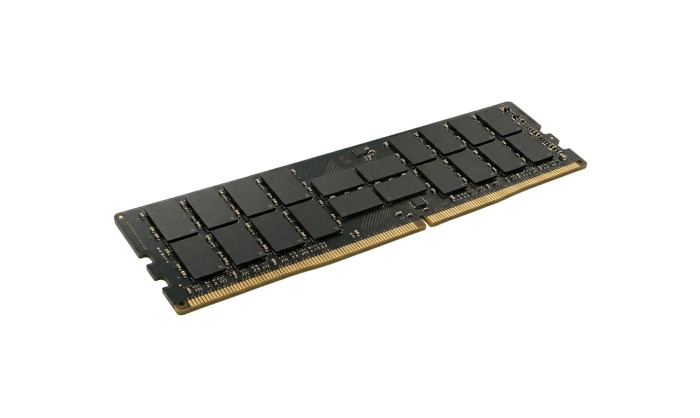
P22322-88M - HP 16GB DDR4-3200/PC4-25600 RDIMM 288-Pin CL22 Dual Rank x4 ECC Registered Memory Module
- Price
- $0.00
- Brand
- Attribute not found
- Sku
- P22322-88M
- Status
- Available
P22322-88M pairs 3200 speed with dual-rank density, which suits busy virtualization hosts rather than lightly loaded application servers.
Specifications:
- Capacity: 16GB
- Speed: DDR4-3200 (PC4-25600)
- CAS Latency: CL22
- Rank and Organization: Dual rank x4
- Form Factor: 288-pin RDIMM, 1.2V
- Error Correction: ECC registered
Market Value: Dual-rank 3200 modules are priced close to their single-rank equivalents, so the extra interleaving performance comes at very little cost.
Reason to Buy: Buy this if your server runs a lot of virtual machines. Dual-rank modules move data more efficiently when the memory stays busy.
6. P02015-001: HP 16GB DDR4-2666 ECC Registered RDIMM
P02015-001 - HP 16GB PC4-21300 DDR4-2666MHz ECC Registered CL19 288-Pin RDIMM Dual Rank x8 Memory Module
- Price
- $188.00
- Brand
- Hynix
- Sku
- P02015-001
- Status
- Available
P02015-001 targets Skylake-era ProLiant Gen10 servers, where 2666 MHz is the ceiling and x8 organization keeps prices down.
Specifications:
- Capacity: 16GB
- Speed: DDR4-2666 (PC4-21300)
- CAS Latency: CL19
- Rank and Organization: Dual rank x8
- Form Factor: 288-pin RDIMM, 1.2V
- Error Correction: ECC registered
Market Value: The x8 organization makes this one of the cheaper 16GB registered parts, and 2666 pricing sits well below 3200 equivalents.
Reason to Buy: Buy this for a first-generation Xeon Scalable server. It runs at the fastest speed that the CPU accepts, so you never pay for unused speed.
7. 871375-001: HP 16GB DDR4-2133 ECC Registered RDIMM
871375-001 - HP 16GB DDR4-2133/PC4-17000 RDIMM 288-Pin CL15 Dual Rank x4 ECC Registered Memory Module
- Price
- $145.00
- Brand
- Attribute not found
- Sku
- 871375-001
- Status
- Available
871375-001 is the entry point for expanding older Gen9 hosts without touching the rest of the configuration.
Specifications:
- Capacity: 16GB
- Speed: DDR4-2133 (PC4-17000)
- CAS Latency: CL15
- Rank and Organization: Dual rank x4
- Form Factor: 288-pin RDIMM, 1.2V
- Error Correction: ECC registered
Market Value: 2133 parts sit at the bottom of the DDR4 price curve, giving one of the lowest costs per gigabyte on this list.
Reason to Buy: Buy this if you just want more memory in an older Gen9 server at the lowest cost, without replacing the modules already fitted.
8. 869365-001: HP 16GB DDR4-2400 ECC Registered RDIMM
869365-001 - HP 16GB DDR4-2400/PC4-19200 RDIMM 288-Pin CL17 Single Rank x4 ECC Registered Memory Module
- Price
- $181.00
- Brand
- Attribute not found
- Sku
- 869365-001
- Status
- Available
869365-001 fits Xeon E5 v4 and early Gen10 platforms that run their memory bus at 2400 MT/s.
Specifications:
- Capacity: 16GB
- Speed: DDR4-2400 (PC4-19200)
- CAS Latency: CL17
- Rank and Organization: Single rank x4
- Form Factor: 288-pin RDIMM, 1.2V
- Error Correction: ECC registered
Market Value: 2400 pricing lands a step above the 2133 floor and well under 2666, which suits hosts you plan to keep for another two years.
Reason to Buy: Buy this if your Xeon E5 v4 server runs at 2400 MT/s and you want to add memory without slowing the modules already installed.
9. 5YZ56AA: HP 8GB DDR4-2933 ECC Registered RDIMM
5YZ56AA - HP 8GB DDR4-2933/PC4-23400 RDIMM 288-Pin CL21 Single Rank x8 ECC Registered Memory Module
- Price
- $0.00
- Brand
- Attribute not found
- Sku
- 5YZ56AA
- Status
- Available
5YZ56AA covers small, precise top-ups where a full 16GB module would waste both budget and slot capacity.
Specifications:
- Capacity: 8GB
- Speed: DDR4-2933 (PC4-23400)
- CAS Latency: CL21
- Rank and Organization: Single rank x8
- Form Factor: 288-pin RDIMM, 1.2V
- Error Correction: ECC registered
Market Value: The lowest ticket price here, and it avoids paying for 16GB when a host needs only a few gigabytes more.
Reason to Buy: Buy this if you only need a small top-up. It fills the empty slots on a Cascade Lake server at full speed without paying for 16GB.
10. J9P82A: HP 8GB DDR4-2133 ECC Registered RDIMM
J9P82A - HP 8GB DDR4-2133/PC4-17000 RDIMM 288-Pin CL15 Single Rank x4 ECC Registered Memory Module
- Price
- $181.00
- Brand
- HP
- Sku
- J9P82A
- Status
- Available
J9P82A remains the cheapest way to balance channels on legacy ProLiant hardware or to hold a shelf spare.
Specifications:
- Capacity: 8GB
- Speed: DDR4-2133 (PC4-17000)
- CAS latency: CL15
- Rank and Organization: Single rank x4
- Form Factor: 288-pin RDIMM, 1.2V
- Error Correction: ECC registered
Market Value: Listed at $201.00, typical for a low-density legacy RDIMM, though per gigabyte it costs more than the 16GB parts above.
Reason to Buy: Buy this if you need to even out the slots in an older Gen9 server, or want a tested spare module ready in case one fails.
Always cross-check the part number against your server’s QuickSpecs before ordering. HP validates specific modules for each platform, and an unsupported DIMM may run at a speed below its rated speed.
Five Memory Upgrade Mistakes to Avoid
These five mistakes cost far more performance and budget than any brand decision, and each one takes only a few minutes of planning to avoid completely.
1. Purchasing Solely Based on Capacity
Two 32GB modules at the wrong rank or speed lose to four matched 16GB modules, so read every specification line rather than the capacity number alone.
2. Leaving Channels Unbalanced
Populating five of eight channels strands a large slice of bandwidth, so fill every channel evenly before you spend anything on extra capacity per socket.
3. Treating DDR5 as a Drop-In
Different keying, voltage, and on-module power design stop a DDR5 module from ever seating in a DDR4 board, so settle the platform before you buy memory.
4. Ignoring Correctable-Error Logs
ECC memory identifies the degrading DIMM in the BMC log, so review those counters monthly and replace the module during a planned maintenance window.
5. Mixing Vendors Mid-Bank
Identical specs on paper still hide real timing differences, so source every module in a channel from one vendor and keep the part numbers consistent.
Avoid these five traps and your server memory delivers the bandwidth, stability, and service life you paid for, without a second order to correct the first.
Final Thoughts
Your hardware decides the generation, not the spec sheet. Xeon E5 v4, Xeon Scalable 1st to 3rd Gen, and EPYC Rome or Milan estates should stay on DDR4 ECC RAM, which suppliers will support for years. New 4th- or 5th-Gen Xeon Scalable and EPYC Genoa nodes accept only DDR5 ECC RAM.
Configuration matters more than generation. Fill every channel evenly, match rank and speed across all sockets, use the correct DIMM type, and monitor the correctable-error logs. Buy new modules for tier-one nodes, and test refurbished memory everywhere else.
Ready to upgrade? Browse the server memory catalog, filter to your exact part number, and compare new against refurbished pricing. Not sure what your platform supports? Contact our team with your server model. Upgrading several hosts? Request a bulk quote or call +1 855-483-7810.
Frequently Asked Questions
- Is DDR5 ECC RAM compatible with DDR4 servers?
No. DDR5 ECC RAM uses different keying, 1.1V power, and on-DIMM regulation, so DDR4 server DIMMs and slots remain physically incompatible.
- Do I really need ECC memory in a server?
Yes. ECC memory corrects single-bit errors and reports failing modules, preventing silent data corruption and unplanned downtime on enterprise memory workloads.
- Can I mix DDR4 speeds during a memory upgrade?
You can, but all server RAM in that bank runs at the slowest module’s speed, so matching speed and rank always delivers better results.
- Is refurbished server memory reliable for production?
Tested refurbished modules perform like new ones. Use them for scale-out and lab capacity; reserve new ECC memory for critical production nodes.
Categories


tags

Expert team support
We accept POs from fortune 1000 companies, government agencies, defense, schools and hospitals.
Do you need advice on buying or selling hardware? Fill out the form and we will return.

Sales & Support
(855) 483-7810
We respond within 48 hours on all weekdays
Opening hours
Monday to thursday: 08.30-16.30
Friday: 08.30-15.30



