


SFF vs LFF Drive Bays: Which One Does Your Server Need?

Key Takeaways
- SFF refers to 2.5-inch drives, and LFF refers to 3.5-inch drives; the bay, not the drive, sets the limit.
- SFF drive bays win on density, IOPS per rack unit, and power consumption, making them the default for virtualization and databases.
- LFF drive bays win on cost per terabyte, giving backup, archive, and media servers far cheaper bulk storage.
- Drive bay sizes are determined by the server chassis and backplane, so confirm both before ordering any drive.
- SSD compatibility is widest in SFF bays, while HDD compatibility spans both; LFF SSDs are rare and usually require an adapter.
- A 2.5-inch to 3.5-inch converter tray lets an SFF drive sit in an LFF bay, but not the other way around.
Overview
Buying the wrong hard drive for a server is one of the most common and avoidable procurement mistakes in IT. The drive itself may be flawless, but if the carrier does not fit into the bay, the deployment stops right there.
That is the core of the SFF vs LFF debate. These are two physical standards, 2.5-inch and 3.5-inch, and they determine what storage your machine can accept. Density, cost per terabyte, and SSD compatibility all follow from that one choice.
This guide clearly explains drive bay sizes in simple terms. It explains where each format is best suited, and walks through the three checks that confirm compatibility before you place an order.
What Drive Bay Sizes Actually Mean
A drive bay is the slot on the front or rear of a server chassis where a disk is inserted. Behind that slot sits the backplane, which carries SAS or SATA connectivity to the RAID controller. Two mechanical standards dominate enterprise hardware:
- SFF (Small Form Factor): A 2.5-inch drive, approximately 70 mm wide, mounted in a 2.5-inch carrier.
- LFF (Large Form Factor): A 3.5-inch drive, approximately 102 mm wide, mounted in a 3.5-inch carrier.
Drive bay sizes are a property of the chassis, not the drive. A 1U server with eight SFF bays will never accept a 3.5-inch disk, regardless of interface or capacity. This is why the SFF vs LFF question is answered by consulting the server specification sheet, not the drive datasheet.
What Is an SFF (Small Form Factor) Drive?
The 2.5-inch form factor is now the standard that dominates modern data center design. Because the platters and NAND packages are smaller, vendors can fit 8, 10, 16, or even 24 bays into the same rack height that would hold only four LFF disks. That density is the entire point.
SFF drives also draw less power and generate less heat per spindle, which compounds across a full rack. Nearly every enterprise SSD ships in this format first, so SSD compatibility is broadest here. The trade-off is cost: an SFF disk almost always costs more per terabyte than its 3.5-inch equivalent, and maximum capacities lag.
Typical SFF workloads:
- Virtualization hosts operate dozens of VMs, each demanding high levels of random IOPS.
- Transactional databases designed for scenarios where low latency is more critical than total capacity.
- Blade and 1U rack servers are used when physical space is a limiting factor.
What Is an LFF (Large Form Factor) Drive?
The classic 3.5-inch disk is a large-form-factor drive. It is bigger, heavier, and usually slower for random access, but it holds the crown for capacity and cost efficiency. Helium-filled 3.5-inch nearline SAS drives reach 20 TB and beyond, which no mainstream 2.5-inch mechanical drive can match.
LFF drive bays are common on 2U storage servers, JBOD shelves, and tower systems, with four, eight, twelve, or fourteen bays behind a single chassis face. If your requirement is measured in raw terabytes rather than transactions per second, the large-form-factor drive is the economical choice.
Common LFF workloads:
- Backup targets include Veeam repositories and long-term archive tiers, ensuring your data is safely stored and easily accessible whenever you need it.
- Media libraries, surveillance recordings, and file servers all play an important role in keeping our digital environment organized and secure. They help us access information quickly and ensure our data is safely stored.
- Object storage and cold data nodes truly shine when it comes to sequential throughput, making everything run smoothly and efficiently.
Side-by-Side Comparison Between SFF vs LFF
| Factor | SFF (2.5-inch) | LFF (3.5-inch) |
|---|---|---|
| Bay density | 8–24 bays in 1U–2U | 4–14 bays in 1U–2U |
| Max capacity per drive | Lower on HDD, high on SSD | Highest available (20 TB+) |
| Cost per terabyte | Higher | Lowest |
| Power and heat | Lower per drive | Higher per drive |
| Random IOPS | Excellent, especially SSD | Modest |
| SSD compatibility | Native and widest choice | Adapter usually required |
| Best fit | Virtualization, databases, VDI | Backup, archive, media, NAS |
HDD Compatibility and SSD Compatibility by Bay Size
Form factor and interface are two separate checks, and both must pass. HDD compatibility is the simpler of the two: 2.5-inch enterprise HDDs fit SFF bays, 3.5-inch HDDs fit LFF bays, and the backplane determines whether the disk uses SAS, SATA, or both. A SAS-only backplane will physically accept a SATA disk, but a SATA controller will never drive a SAS disk.
SSD compatibility deserves more attention. Enterprise SATA and SAS SSDs are built almost exclusively in the 2.5-inch small form factor drive standard, so an LFF-only chassis requires a converter tray to host them. NVMe adds a third requirement: the bay must be wired to PCIe lanes via a U.2 or U.3 backplane, which many older SFF servers lack. Before ordering, verify three things:
- The size of the mechanical bay, whether SFF or LFF, is specified on the chassis.
- The backplane protocol includes options like SATA, SAS, tri-mode, or NVMe-capable U.2/U.3, offering you a variety of reliable choices.
- The carrier generation varies because vendors often change tray designs with each server generation, making it an interesting aspect to consider.
Use this matrix as a quick reference before you make a purchase:
Comparison Table: SFF Bay vs LFF Bay
| Drive Type | SFF (2.5-inch) Bay | LFF (3.5-inch) Bay |
|---|---|---|
| 2.5-inch SATA/SAS HDD | Native fit | Requires a 2.5-to-3.5-inch converter tray |
| 3.5-inch Nearline SAS/SATA HDD | Not supported | Native fit |
| 2.5-inch SATA/SAS SSD | Native fit | Requires a converter tray |
| NVMe U.2 / U.3 SSD | Supported only with a PCIe-wired U.2/U.3 backplane | Rarely supported |
| M.2 SSD | Via adapter carrier or riser | Via adapter carrier |
Matching Drive Bays to Your Server Chassis
Most vendors offer the same server chassis in both SFF and LFF formats, so the model number on the bezel doesn’t provide much information. Use these tips to verify what your machine can actually accommodate before ordering drives or trays.
- Verify the drive cage, not the model name. An HPE ProLiant DL380 Gen10 comes with 8SFF, 24SFF, or 12LFF bays; a Dell PowerEdge R740 offers 8LFF or 16SFF bays. The determining factor is the cage part number.
- Next, verify the backplane protocol. SATA, SAS, tri-mode, and NVMe-capable U.2/U.3 backplanes appear identical from the front but accommodate different drives.
- Calculate capacity per bay. Divide your capacity target by the bay count; if the result exceeds what a 2.5-inch drive delivers, you need LFF drive bays.
- Allow workload characteristics to determine the choice: latency-sensitive or VM-heavy workloads favor SFF; large-scale retention and archiving favor LFF.
- Make sure to match the tray precisely with the server generation. Vendors modify carrier designs between generations so that a Gen9 tray won’t fit in a Gen10 Plus bay.
- Assume you will not change the cage later. Most drive cages and backplanes are difficult to upgrade in the field, so it is best to plan the drive bay sizes when purchasing, rather than afterward.
- Mix deliberately: many estates operate SFF for the hot tier with LFF shelves behind for retention, and use blank fillers in empty bays to protect airflow.
Can You Put an SFF Drive in an LFF Bay?
Yes, in one direction only. A 2.5-inch to 3.5-inch converter tray, such as the HPE 661914-001 smart carrier converter, allows a small form factor drive to fit inside a large form factor carrier so it can be seated in an LFF bay. This is the standard way to add SSDs to an LFF storage server.
The reverse is impossible: a large form factor drive cannot fit into an SFF bay, and no adapter exists because the physical size simply won’t allow it. If your chassis is SFF and you need 16 TB in a single slot, consider choosing a different chassis instead of a different bracket.
Top 5 Drive Trays on Direct Macro
A drive without the right carrier is stock; you cannot deploy it. These five trays cover the most common enterprise platforms for both drive bay sizes. Browse the full drive tray range, or jump straight to SFF drive bays and LFF drive bays.
1. HPE 651687-001 – 2.5″ SFF Smart Carrier

651687-001 - HP 2.5-inch Hot Swap SAS / SATA Caddy for ProLiant G8 G9 and G10
- Price
- $51.00
- Brand
- HP
- Sku
- 651687-001
- Status
- Available
This is the tray most HPE shops typically keep on hand. If your ProLiant is an 8SFF or 24SFF configuration, the HPE 651687-001 drive tray is the easy-to-use carrier that fills those bays reliably.
Features:
- Small 2.5-inch drive carrier suitable for HPE ProLiant Gen8 and Gen9 servers.
- Supports SAS and SATA HDDs as well as enterprise SSDs on the same backplane.
- Hot-swap latch featuring dual-color LED indicators for activity and faults.
- Includes four mounting screws needed for drive installation.
Pros:
- Provides the broadest compatibility with HPE rack servers, making it the most reliable standard SFF spare to keep in stock.
- Tool-less hot-swap latch means a failed drive can be replaced in seconds without powering down the chassis.
- Full SSD compatibility allows the same tray to hold both spinning disks and flash, supporting a mixed storage tier.
Cons:
- It does not fit Gen10 Plus or Gen11 Basic Carrier bays, as these use entirely different front bezels and latch mechanisms.
- The plastic latch arm is the usual failure point and can snap if the tray is forced into a misaligned bay.
- It is restricted to HPE platforms, providing no benefit when used with Dell, Lenovo, or Supermicro server chassis.
2. Dell F238F – 3.5″ LFF Hot-Swap Tray
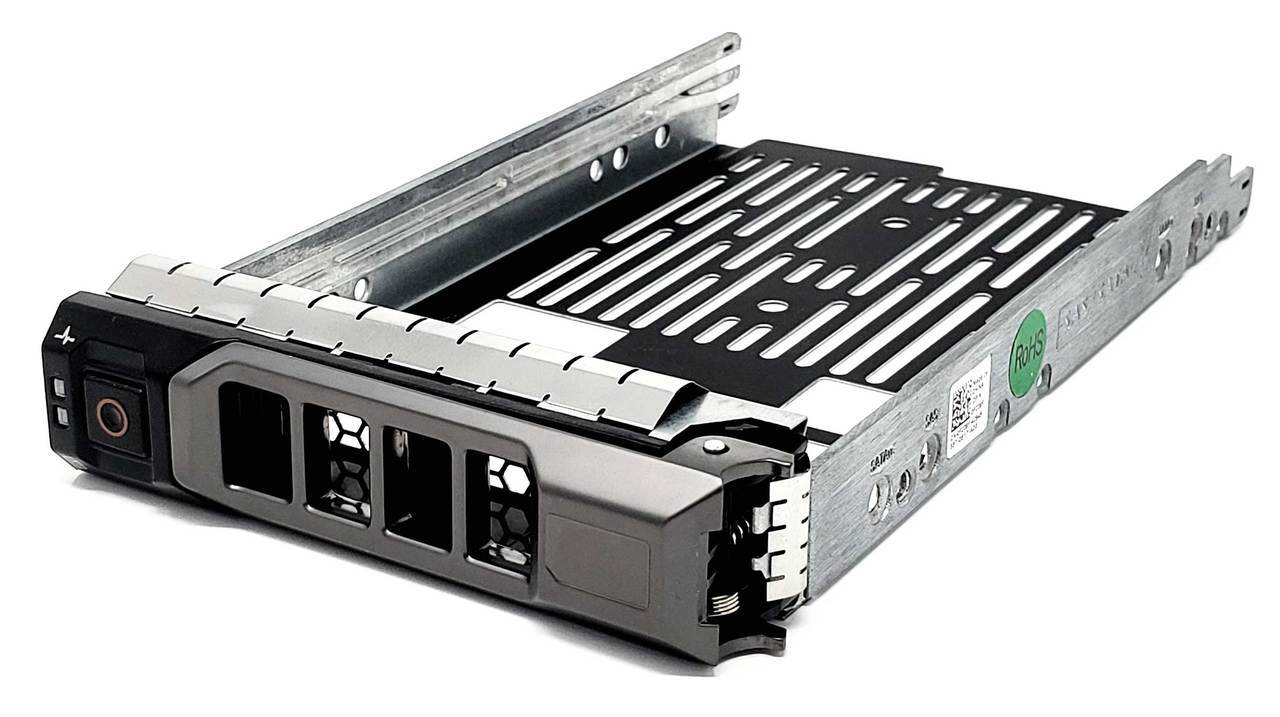
F238F - Dell 3.5-inch SAS/SATA Hard Drive Tray for PowerEdge R Series
- Price
- $51.00
- Brand
- Dell
- Sku
- F238F
- Status
- Available
The workhorse carrier for older PowerEdge storage builds. Pair the Dell F238F drive tray with 3.5-inch nearline disks when you are filling LFF bays on an 11G to 13G chassis.
Features:
- A 3.5-inch drive carrier compatible with Dell PowerEdge 11G to 13G servers.
- Steel frame featuring support for SAS and SATA on the standard Dell backplane.
- The front LED array indicates power, activity, and potential failure alerts.
- This adapter works well with the Dell 9W8C4, making it easy to mount 2.5-inch drives and upgrade your storage.
Pros:
- Rigid metal construction better withstands the weight and vibration of high-capacity nearline drives than plastic alternatives.
- Covers several PowerEdge generations, keeping spare-part inventory simple for estates running mixed R-series and T-series hardware.
- Accepts a converter bracket, allowing the same LFF bay to host a small form factor drive when needed.
Cons:
- Superseded on 14G and newer PowerEdge servers, so it will not fit the R640, R740, or later chassis.
- Heavier and bulkier than SFF carriers, they slow bulk handling during large migration or refresh projects.
- Screws are often missing from pulled units, so confirm the kit contents before ordering replacement stock.
3. Lenovo 03X3835 – 3.5″ SFF Hot-Swap Tray
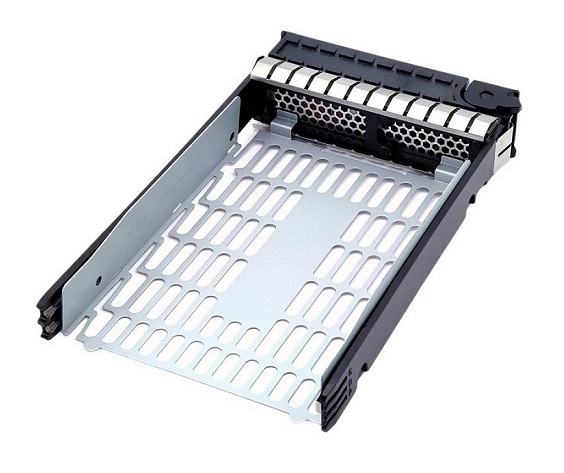
03X3835 - IBM / Lenovo SAS Hot-Swappable 3.5-inch Hard Drive Tray for ThinkServer TS430
- Price
- $61.75
- Brand
- Lenovo
- Sku
- 03X3835
- Status
- Available
A clean drop-in for ThinkServer and System x estates. The Lenovo 03X3835 drive tray is the simplest way to fill empty 3.5-inch bays without third-party fitment guesswork.
Features:
- 5-inch SFF carrier compatible with Lenovo Think Server and System x rack and tower servers.
- Supports a range of drives, including SAS, SATA, and NL-SAS, through the compatible backplane.
- Release handle with hot-swap capability, featuring integrated activity and fault LEDs.
- A blank filler variant is available to preserve airflow in unpopulated bays.
Pros:
- A simple replacement for ThinkServer drives that sidesteps the usual compatibility issues found with third-party generic caddies.
- Good airflow design keeps drive temperatures stable in densely populated 3.5-inch chassis with twenty-four bays.
- Widely available refurbished, which cuts the cost of populating empty bays during a phased storage expansion.
Cons:
- Lenovo updated the carrier design for the ThinkSystem SR-series, so this tray is incompatible with newer generations.
- LED behavior varies with the RAID controller, which can cause fault indications to be inconsistent on unsupported adapter cards.
- The resale market is more limited than that of HPE and Dell trays, which makes it more difficult to redeploy surplus stock later.
4. Supermicro MCP-220-00075-0B – 3.5″ LFF Hot-Swap Tray

MCP-220-00075-0B - SuperMicro 3.5" Hot-swap HDD Tray w/ Hollow-Panned Dummy (Black)
- Price
- $59.50
- Brand
- SuperMicro
- Sku
- MCP-220-00075-0B
- Status
- Available
The value pick for high-bay-count builds. The Supermicro MCP-220-00075-0B drive tray supports a wide range of Supermicro chassis at a lower cost than branded OEM carriers.
Features:
- 5-inch LFF hot-swap carrier compatible with Supermicro Super Server and Super Chassis platforms.
- Black anodized steel body with a vented face for improved front-to-back airflow.
- Supports SAS and SATA HDDs using standard 3.5-inch screw mounting points.
- Compatible with a wide range of Supermicro chassis, making it a versatile choice for many setups.
Pros:
- One of the most cross-compatible LFF trays available, fitting a broad range of Supermicro chassis without requiring revision-specific matching.
- All-metal construction resists flex under heavy helium drives, protecting connector alignment during frequent hot-swap cycles in busy arrays.
- Typically cheaper than branded OEM carriers, reducing the cost of populating high-bay-count storage servers at scale.
Cons:
- Some revisions lack an integrated drive status LED, making it slower to identify a failed disk during maintenance.
- Requires four screws per drive, so bulk deployments take noticeably longer than those with tool-less OEM carrier designs.
- Fitment still varies by chassis revision, so the exact Super Chassis model must be confirmed before placing a bulk order.
5. Cisco 800-45806-01 – UCS C3X60 3.5″ LFF Hot-Swap Tray
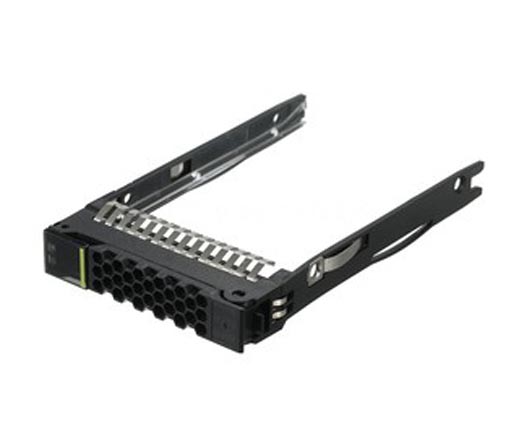
800-37836-01 - Cisco Hot-Pluggable 3.5-inch Hard Drive Tray for UCS C240 / C220 Server
- Price
- $59.50
- Brand
- Cisco
- Sku
- 800-37836-01
- Status
- Available
Built for dense, top-load UCS storage nodes where vibration and seating accuracy are critical. If you run C3000-series hardware, the Cisco 800-45806-01 drive tray is the preferred carrier to source rather than a generic sled.
Features:
- 5-inch large-form-factor drive carrier for Cisco UCS C3000 and C3X60 storage servers.
- Designed for top-load, high-density JBOD-style chassis with dozens of bays.
- Supports SAS and SATA with a secure locking latch for safe transport seating.
- A durable sled body designed to support high-capacity nearline enterprise drives.
Pros:
- Purpose-built for Cisco dense storage nodes, providing reliable seating in top-load bays where vibration is a concern.
- The locking mechanism prevents accidental drive release during rail extension and routine servicing of populated storage chassis.
- Supports the largest nearline drives with ease, enabling petabyte-scale archives on a single UCS platform.
Cons:
- Strictly Cisco-specific, offering no value for reuse if the estate later standardizes on another server chassis vendor.
- Higher unit price compared to generic LFF trays, which accumulates rapidly across sixty-bay storage node deployments.
- Availability is tighter in the secondary market so that lead times can stretch during large refresh or expansion projects.
Final Thoughts
The SFF vs LFF decision is a workload question in a hardware costume. Choose SFF drive bays when performance density matters: virtualization, databases, VDI, and any use case where SSD compatibility and IOPS per rack unit drive the design. Choose LFF drive bays when the metric is cost per terabyte: backup repositories, archives, media, and bulk file storage.
Whichever way you go, the chassis and backplane have the final say, and the carrier is what turns a compatible drive into a working one. Confirm the bay size and the protocol, then match the tray to your exact server generation before you order.
Ready to fill those bays? Browse the full drive tray range on Direct Macro, or go straight to SFF drive bay trays for 2.5-inch builds and LFF drive bay trays for 3.5-inch builds. Not sure which carrier your server generation takes? Send us your model and drive cage part number, and our team will confirm the exact fit before you order.
Frequently Asked Questions
- What does SFF vs LFF mean in server drive bays?
SFF refers to 2.5-inch drives, while LFF stands for 3.5-inch drives; these are the two common drive bay sizes you’ll find in enterprise servers.
- Can a large form factor drive fit an SFF bay?
No, a 3.5-inch large form factor drive is physically too big, and unfortunately, there isn’t an adapter available to make it smaller.
- Is SSD compatibility better in SFF or LFF bays?
SSD compatibility is much wider in SFF bays since most enterprise SSDs come in the 2.5-inch small form factor drive standard.
- How do I confirm HDD compatibility with my server chassis?
Make sure to check the size of the chassis bay, the backplane protocol, and the carrier generation. If any of these don’t match, the HDD compatibility might be affected.
Categories


tags

Expert team support
We accept POs from fortune 1000 companies, government agencies, defense, schools and hospitals.
Do you need advice on buying or selling hardware? Fill out the form and we will return.

Sales & Support
(855) 483-7810
We respond within 48 hours on all weekdays
Opening hours
Monday to thursday: 08.30-16.30
Friday: 08.30-15.30



