


What is a Rack Server and Why Businesses Should Use It?
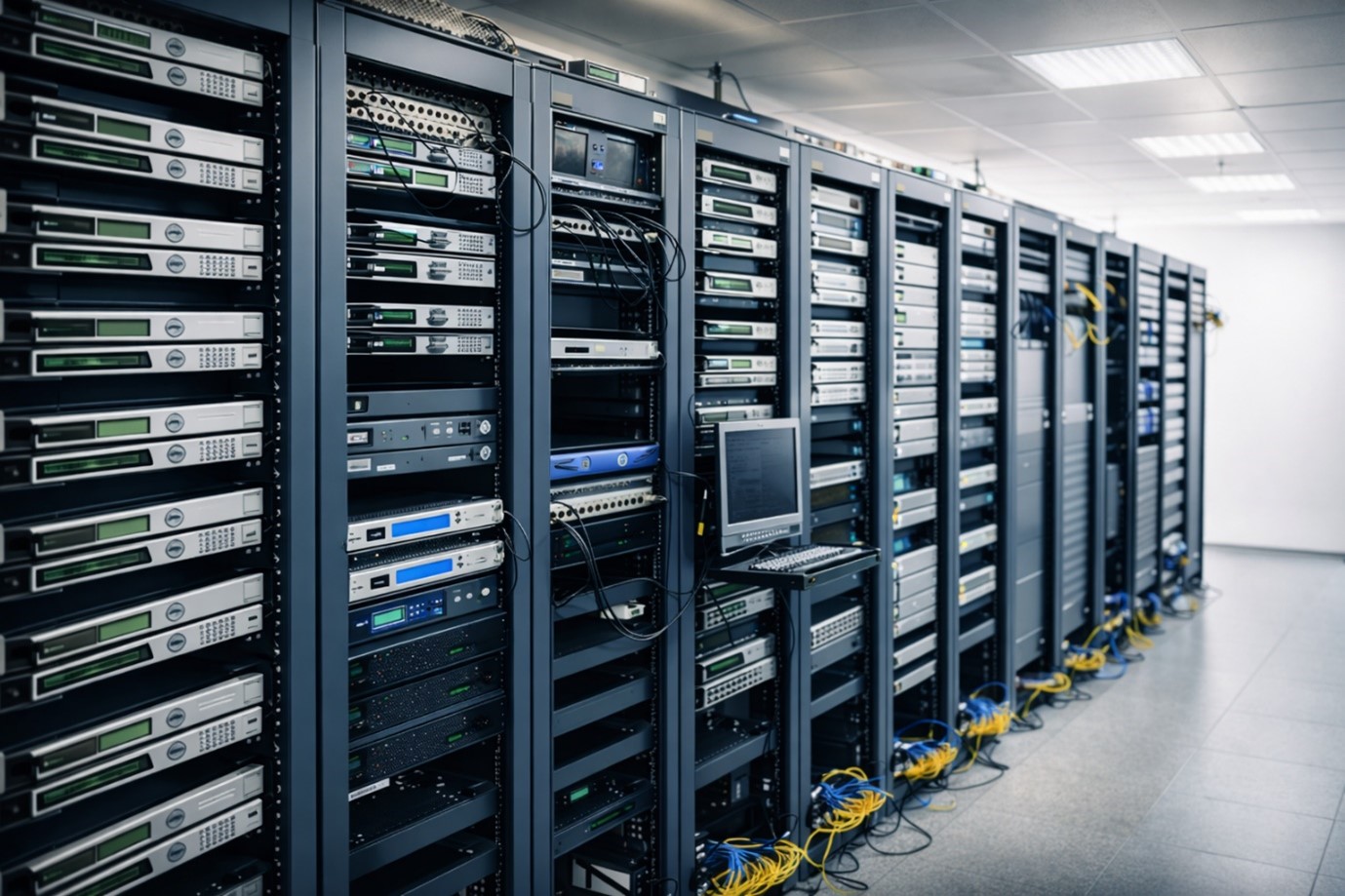
Data is essential for every business, no matter the size or industry. Success depends on effective data management, supported by reliable systems for payment processing, inventory, and customer records. An important element often overlooked here is the server rack.
If you have seen rows of blinking equipment in an IT room, you’ve seen server racks. This guide explains what rack servers are, their benefits, and how to select the best fit for your business and startups.
Understanding the Basics: What is a Server Rack?
To understand why businesses, use these systems, let’s start with the basics. A rack server, or rack-mount server, is a computer designed to fit into a rack. Unlike tower servers, which resemble large desktop PCs, rack servers are wide and flat, allowing them to be stacked.
A server rack is a steel frame for servers and related equipment, such as switches, routers, and PDUs. It keeps IT hardware organized in one place.
The Strategic Importance of Server Racks for Modern Business
Moving from a single computer to a server rack setup is a big step for growing startups and companies. Here’s why this change is important:
1.Optimal Space Utilization
Office space is expensive for growing businesses. A server rack lets you stack several servers in a small area. Without a rack, each server would need its own table, but with a rack, they all fit neatly in one cabinet.
2.Enhanced Airflow and Cooling
Heat is a major threat to hardware equipment, especially in overcrowded, poorly ventilated spaces. Server racks improve airflow with perforated doors and an open design for cooling. Dedicated cable pathways and organizers keep cables tidy, labelled, and accessible for better cooling, easier maintenance, and reduced risk of mistakes.
Exploring the Primary Types of Server Racks
When choosing a server rack, consider its build and intended location. Some racks focus on security and cooling, others on access or budget.
Here are the main types of server racks used in today’s IT setups.
1. Enclosed Server Cabinets
The enclosed cabinet racks is the most common type of server rack in professional data centers. It has four vertical rails and is fully enclosed with front and back doors and side panels.
- Best For: These cabinet server racks are great option for high-security environments and managed airflow.
- Key Advantage: The doors can be locked, so they protect against unauthorized access. These racks are also made for hot-aisle and cold-aisle setups, which carefully control airflow to keep the servers cool.
- Drawback: They are heavier and more expensive than open designs.
2. Open-Frame Racks
An open-frame server rack is just a frame without side panels or doors. They come in two-post and four-post versions.
- Best For: Operations that require frequent cable changes and easy hardware access.
- Key Advantage: Because there are no doors, airflow is completely unobstructed, and technicians can reach any part of the network server rack without hindrance. They are also much more affordable.
- Drawback: They offer zero physical security and are prone to dust accumulation.
3. Wall-Mount Racks
A wall-mount small server rack is designed to be mounted to a wall rather than sitting on the floor. These are often used for networking equipment, such as switches and patch panels.
- Best For: Small offices, retail stores, or “edge” computing locations where floor space is non-existent.
- Key Advantage: It saves floor space and keeps important equipment off the ground and out of the way.
- Drawback: They have limited weight capacity and typically hold only 6U to 18U of equipment.
4. Portable or “Rolling” Racks
These racks are basically computer server racks on strong wheels. They often have built-in handles to make them easier to move.
- Best For: Media production sets, temporary testing labs, or businesses that frequently reorganize their office layout.
- Key Advantages: You can relocate your entire server rack setup to a different room or closer to a power source without removing any hardware.
- Drawback: Stability can be an issue if the weight isn’t distributed correctly (always keep the heaviest items at the bottom).
5. Quiet or Acoustic Racks
Standard server racks can be very loud because of the fast fans inside the servers. Acoustic racks are special cabinets lined with sound-absorbing material.
- Best For: Offices where the computer server rack must sit in the same room as employees (like a creative studio or open-plan office).
- Key Advantages: They can reduce server noise by up to 30dB, enhancing employee comfort in shared workspaces.
- Drawback: They require specialized internal cooling systems because the soundproofing insulation can trap heat.
Comparison Table: Which Rack Fits Your Needs?
| Rack Type | Security | Airflow Style | Typical Size | Ideal Environment |
| Enclosed Cabinet | High (Locked) | Controlled/Forced | 42U – 48U | Data Centers |
| Open Frame | Low | Ambient | 24U – 42U | Dedicated IT Rooms |
| Wall-Mount | Medium | Ambient | 6U – 12U | Small Offices / Closets |
| Acoustic Rack | High | Internal Fans | 12U – 24U | Open Offices |
Why Your Business Needs a Dedicated Server Data Rack?
A server data rack for businesses offers professional-grade reliability beyond standard computers.
1. Physical Security
In many industries, data privacy is a legal requirement (such as HIPAA or GDPR). An enclosed server rack can be locked, preventing unauthorized personnel from physically accessing the hard drives or ports where your sensitive data lives.
2. Scalability
As your business grows, so do your data needs. You can simply add another unit to your current server racks, supporting modular IT growth.
3. Centralized Power Management
With a server rack, you can connect all your equipment to one Uninterruptible Power Supply (UPS). If the power goes out, your servers stay online long enough to shut down safely and avoid file damage.
What to Consider When Buying a Server Rack?
Buying a server rack is a long-term choice. To avoid mistakes, keep these five key factors in mind:
1. Size and Unit Requirements (The “U” Factor)
Rack height is measured in units called ‘U,’ where 1U is 1.75 inches tall. For most small offices and stores, a 12U or 18U rack is a common starting point, holding a few servers, a network switch, and power equipment without taking much space. If you need more room later, a 24U rack can accommodate more data storage or extra devices, such as backup drives and patch panels (network wiring hubs). A 42U rack is standard for large organizations with many servers or complex IT systems. Plan for growth by choosing a rack with about 20% more space than you need now.
2. Depth and Width Compatibility
Make sure your server rack is deep enough for your longest server, plus three extra inches for cables. Standard rack depths range from 27 to 42 inches.
3. Weight Capacity
A full server rack can weigh more than 2,000 pounds. Check the static weight rating (when the rack is not moving) and the dynamic rating (if the rack has wheels).
4. Power Distribution and Grounding
A good server rack needs a Power Distribution Unit (PDU). Choose racks with built-in cable paths and grounding points to protect your equipment from power surges.
5. Security and Monitoring
If your rack is in a public space, pick a cabinet with locking doors. Many new server racks also include smart sensors that remotely monitor humidity and temperature.
Components Found in a Network Server Rack
A good rack setup includes more than just servers. To get the most from your server data rack, you’ll usually add:
- Patch Panels: This component helps to manage network connections.
- Network Switches: Businesses and small startups use network switches to connect all servers and office computers at the same time.
- PDU (Power Distribution Unit): PDUs perform as a high industrial power strip for the server rack.
- Rack Shelves: These types of racks are used for non-rack-mount equipment such as small NAS drives or modems.
- Cooling Fans: These fans help to improve airflow and reduce heat buildup in server racks.
Maintenance and Best Practices for Server Racks
To make sure your server data rack lasts for years, follow these best practices:
- Label Everything: Use a label maker for every cable and server. This saves time and frustration during outages.
- Monitor Temperature: Install a basic digital thermometer inside the rack. If the temperature exceeds 80°F (27°C), you need better cooling.
- Weight Distribution: Always put the heaviest equipment, e.g. UPS batteries, at the bottom of the server rack to keep it stable and prevent tipping.
- Leave Room for Expansion: Don’t fill your rack all the way. Use blanking panels between servers to help with airflow and leave space for upgrades.
Final Thoughts
A server rack is more than just a piece of equipment for your hardware. It is a foundational investment in your company’s efficiency, security, and growth. Whether you are setting up a small server rack for a startup or a complex network server rack for an enterprise, the benefits of organization and hardware protection are undeniable.
To get started, make a simple list of your current IT equipment and note what hardware you might add in the near future. If you are unsure about your needs or want to avoid mistakes, reach out to us through an email: support@directmacro.com or call us at (855) 483-7810 for a quick consultation. Taking these first steps will help you choose the right server rack and set your business up for long-term success.
Frequently Asked Questions (FAQs)
1 How difficult is it to install a server rack, and do I need help?
Small network server rack units are DIY-friendly, but large 42U cabinets require professional help for leveling, electrical grounding, and high-density cable management to ensure the server data rack remains stable and safe.
2 Are there recommended brands for small business server racks?
Top-tier brands like Direct macro offer reliable small server rack options. Direct macro is trusted for its durability and for its standardized mounting rails, compatible with almost any computer server rack hardware.
3 How often should I inspect or maintain my server rack setup?
Perform a physical inspection every 3 to 6 months. Clean dust from perforated doors, verify cable integrity, and ensure that airflow within your server racks is not obstructed to prevent hardware overheating.
4 How do I know when it’s time to upgrade my rack?
Upgrade your server data rack once you hit 80% capacity or experience cooling issues. If your current small server rack can no longer secure your data or support your power draw, it’s time for a larger cabinet.
5 What is the typical price range for different server racks?
A small server rack typically costs $150–$500, while a professional 42U computer server rack cabinet ranges from $1,200 to $4,000, depending on specialized features such as acoustic soundproofing or high-security locking systems.
Categories


tags

Expert team support
We accept POs from fortune 1000 companies, government agencies, defense, schools and hospitals.
Do you need advice on buying or selling hardware? Fill out the form and we will return.

Sales & Support
(855) 483-7810
We respond within 48 hours on all weekdays
Opening hours
Monday to thursday: 08.30-16.30
Friday: 08.30-15.30



