


How to Choose the Right Lenovo Workstation Graphics Card: Performance, Compatibility and Upgrade Guide

Key Takeaways
- A Lenovo workstation graphics card delivers certified stability in CAD, 3D, video, and engineering applications rather than peak gaming frame rates.
- Buying under a Lenovo part number guarantees that Lenovo has validated the card for your ThinkStation chassis, power supply, and bracket, and it keeps the card inside your existing support entitlement.
- Check five things before you order: workstation model, PCIe slot and clearance, power connectors and wattage, operating system support, and certified driver availability.
- Size VRAM to the workload: 4GB for office and 2D drafting, 8 to 16GB for production CAD and 4K editing, and 24GB or more for simulation and rendering.
- Refurbished professional cards deliver certified performance at a fraction of new-unit pricing, making them the practical route to a fleet-wide upgrade on a fixed budget.
- Upgrade when viewport performance slows you down, VRAM runs out, your workload changes, driver certification ends, or you need newer display outputs.
Introduction
Choosing the right Lenovo workstation graphics card is one of the most important decisions you will make when specifying or upgrading a professional system. The GPU determines how smoothly your CAD models rotate, how fast your renders finish, and whether your applications stay certified and stable under load.
This guide walks IT professionals, system administrators, engineers, and designers through performance tiers, compatibility checks, VRAM sizing, new-versus-refurbished trade-offs, and six specific cards worth shortlisting.
What Is a Workstation Graphics Card?
A workstation graphics card targets professional workloads such as engineering, design, visualization, and science rather than entertainment. It shares GPU silicon with consumer cards but adds validated firmware, professional drivers, error-resilient memory, and thermal designs that handle sustained load in business-critical systems.
The key difference is certification: vendors test these cards on applications such as SOLIDWORKS, CATIA, Revit, AutoCAD, Siemens NX, Maya, and DaVinci Resolve, and then publish the supported driver versions. This certification delivers predictable performance in complex scenes, whereas gaming cards may crash or render incorrectly.
Workstation cards also prioritize reliability through longer product lifecycles, consistent part numbers, enterprise-grade driver support, and cooling solutions suited to chassis airflow.
Further Reading:
Why Choose a Lenovo Workstation Graphics Card?
Lenovo validates every graphics card that carries a dedicated part number against specific ThinkStation and ThinkPad P Series systems. That validation confirms the power connectors, card size, bracket height, and BIOS support, removing most of the uncertainty from an upgrade.
Support is a key benefit, because the workstation’s service agreement covers Lenovo part-numbered GPUs. One vendor then handles warranty claims, driver packages, and firmware updates. For system administrators managing dozens of machines, this single support path often matters more than a minor performance gain. Lenovo provides documentation detailing compatible models, required power supplies, and chassis capacity, making compatibility checks straightforward.
Lenovo also sells its branded professional cards as spares and options throughout the platform’s lifespan, and refurbished stock stays available afterward. You can therefore standardize a fleet on one model and keep buying matching units long after the original purchase window closes.
Types of Lenovo Workstation Graphics Cards
Lenovo workstation graphics cards fall into three broad performance tiers: entry-level, mid-range, and high-performance. Each tier targets a different class of professional workload, chassis size, and power budget, so deciding which tier you belong in immediately narrows your shortlist.
1. Entry-Level Graphics Cards
Low-profile, low-power cards for 2D drafting, multi-monitor office use, light CAD, and basic visualization. Because they draw power from the PCIe slot alone, they install safely in small-form-factor ThinkStation systems with limited cooling and clearance.
2. Mid-Range Graphics Cards
Balanced cards with more VRAM and ray-tracing cores, suited to production CAD, BIM, 3D modeling, and 4K video editing workflows. This tier offers the strongest value for most design teams without requiring a full-tower chassis or a high-wattage power supply.
3. High-Performance Graphics Cards
Large-memory, high-throughput cards for simulation, GPU rendering, AI inference, point-cloud work, and very complex assemblies. These dual-slot cards require a full-tower ThinkStation, supplementary PCIe power, and strong airflow, but they remove memory-related bottlenecks almost entirely.
In practice, most Lenovo workstation users land in the mid-range tier. Confirm your chassis, power supply, and VRAM needs first, then choose the lowest tier that comfortably handles your heaviest daily workload.
How to Choose the Right Lenovo Graphics Card
Six technical factors decide whether a graphics card for Lenovo workstation use will actually deliver the performance you paid for.
1. Graphics Performance
Match GPU core count and clock speed to your application’s benchmark results, not headline specifications, since professional software scales unevenly across architectures.
2. VRAM Capacity
Video memory limits model, texture, and timeline size. Insufficient VRAM causes stuttering and swapping long before the GPU core becomes the bottleneck.
3. PCIe Interface
Confirm the slot generation and lane width. PCIe 4.0 or 5.0 x16 is ideal, though most professional cards run acceptably in older slots.
4. Power Requirements
Check total board power and connector type. Higher-tier cards need supplementary 8-pin or 16-pin power and a suitably rated workstation power supply.
5. Physical Size and Form Factor
Verify slot width, card length, and bracket height. Small-form-factor ThinkStation systems require low-profile, single-slot cards with the correct bracket fitted.
6. Cooling Requirements
Prefer blower-style coolers that exhaust outside the chassis, and confirm the workstation’s airflow and fan configuration support the card’s thermal output.
Weigh these six factors together rather than in isolation. The right Lenovo graphics card is the one that satisfies your performance and VRAM needs while still fitting the slot, power, and cooling limits of your chassis.
Lenovo Graphics Card Compatibility: What to Check Before Buying
Five compatibility checks prevent the most common upgrade failures: a card that will not physically fit, cannot be powered, or will not install and drive your displays.
1. Workstation Model Compatibility
Check Lenovo’s product specification reference for your exact ThinkStation model to confirm the card is validated for that chassis and generation.
2. PCIe Slot Compatibility
Confirm a free x16 slot with enough adjacent clearance, since dual-slot cards block the neighboring slot and may cover onboard headers.
3. Power Supply Requirements
Ensure the power supply meets the card’s rated wattage headroom and has the correct PCIe power connectors physically available, not just sufficient watts.
4. Operating System Compatibility
Verify support for your Windows or Linux release, including enterprise distributions, before deploying across a managed workstation fleet.
5. Driver Support
Confirm current certified drivers exist for your applications, and that the card is not end-of-life with frozen driver branches.
Run all five checks before you order, not after the card arrives. Ten minutes with your workstation’s specification reference and power supply label prevents the vast majority of failed Lenovo GPU upgrades.
New vs. Refurbished Lenovo Graphics Cards: Which Is Right for You?
Both new and refurbished Lenovo graphics cards are valuable in a workstation upgrade. New cards provide the latest architectures, warranties, and driver support. Refurbished cards offer proven, certified performance at lower costs, making them a quick, budget-friendly upgrade for aging systems.
1. Benefits of New Graphics Cards
Buying new maximizes lifespan, support duration, and access to current-generation features across your workstation estate.
- Latest Architecture and Features
Current-generation cards add faster ray tracing, AI acceleration, newer display outputs, and better performance per watt than previous professional generations.
- Full Warranty Coverage
New cards carry a complete manufacturer’s warranty, providing straightforward replacement if a unit fails during its coverage period.
- Longest Driver Support Window
Recent releases stay in active certified driver branches for years, protecting compatibility with future application and operating system updates.
2. Benefits of Refurbished Graphics Cards
Refurbished professional cards let you upgrade more machines per dollar spent without abandoning application certification.
- Significant Cost Savings
Refurbished pricing is typically well below new-unit pricing, enabling a fleet-wide upgrade of Lenovo workstation graphics within an existing hardware budget.
- Proven, Certified Performance
Previous-generation professional cards remain certified for mainstream CAD and design applications, delivering more than enough performance for most everyday workloads.
- Matching Parts for Older Systems
Refurbished stock is often the only practical source of identical replacement cards for standardized, out-of-production ThinkStation workstations.
3. What to Check When Buying Refurbished?
Refurbished buying is low risk when you verify the seller, the part, and the terms before ordering.
- Warranty and Return Policy
Insist on a written warranty and clear return window so a dead-on-arrival card does not become a sunk cost.
- Physical and Cosmetic Condition
Check for bent brackets, damaged connectors, missing screws, dust-clogged fans, or signs of thermal stress on the cooler and PCB.
- Part Number and Authenticity
Confirm that the Lenovo part number and GPU model match the listing and that the original brackets, cables, and adapters are included.
Workstation GPU vs. Gaming GPU: What’s the Difference?
Gaming cards optimize for peak frame rates in one application at a time, and their drivers chase speed title by title. Workstation cards prioritize accuracy, stability, and sustained throughput across dozens of certified professional applications, and their drivers pass validation rather than chasing benchmarks.
That difference shows up in viewport behavior and support. Workstation GPUs hold stable performance, handle high-precision geometry correctly, and carry ISV certification, whereas gaming cards can produce rendering artifacts and fall outside your software vendor’s support.
Professional cards also run shorter and often single-slot, and their blower coolers push heat out of compact chassis. Gaming cards frequently exceed the length, slot width, and power envelope a workstation chassis allows.
| Factor | Workstation GPU | Gaming GPU |
|---|---|---|
| Primary purpose | CAD, 3D, simulation, video, AI | Games and entertainment |
| Driver focus | Certified, stability-first, long support | Per-title performance optimization |
| ISV certification | Yes: SOLIDWORKS, Revit, CATIA, NX | Generally, none |
| Precision and accuracy | Optimized for geometric accuracy | Optimized for frame rate |
| Form factor | Compact, often single-slot, blower cooled | Long, dual/triple-slot, open-air cooled |
| Power draw | Lower, chassis-friendly | Often high, needs large PSU |
| Product lifecycle | Multi-year availability as spares | Short retail lifecycle |
| Support path | Covered by workstation entitlement | Consumer warranty only |
Purchase Tip: Buy the workstation card that clears your VRAM requirement and fits your chassis and power budget, rather than the fastest card you can afford. A certified mid-range Lenovo workstation GPU that your software vendor supports will save more engineering hours than an uncertified gaming card with a higher benchmark score.
How Much VRAM Do You Need for Your Workload?
VRAM requirements scale with model complexity, texture resolution, and timeline size rather than with the number of applications you run. Size the memory to your heaviest recurring project, since running out of VRAM stalls work far more visibly than a slower GPU core.
1. General Business and Office Work
4GB is ample for browsers, Office, multiple 4K displays, and light 2D drafting or dashboard visualization tasks. Cards at this level are usually low-profile and bus-powered, so they suit compact ThinkStation systems used across an office fleet.
2. CAD and 3D Design
8GB to 16GB is suitable for production CAD, BIM, and mid-size assemblies; larger models and rendering benefit from 16GB or more. Shaded views, textures, and design-history data all consume memory alongside the geometry itself.
3. Video Editing
8GB handles 4K editing comfortably; 16GB to 24GB is better for multi-stream 6K/8K timelines, heavy effects, and color grading. Cache-heavy tools such as DaVinci Resolve and After Effects reward extra memory with smoother real-time playback.
4. Engineering and Professional Applications
Simulation, point clouds, GPU rendering, and AI workloads want 24GB or more to keep entire datasets resident in memory. Once a dataset spills to system RAM, solve and render times increase sharply regardless of core performance.
When budget allows, buy one tier above your current VRAM need. Datasets grow steadily, and extra memory extends the card’s useful life far more reliably than a marginal core-performance gain.
Six Lenovo Graphics Cards to Consider
These six Lenovo graphics cards cover the entry and mid-range tiers, from basic multi-display output to certified 8GB CAD performance.
1. 4X67A11584 – Lenovo ThinkSystem NVIDIA Quadro P620 2GB PCIe Active GPU
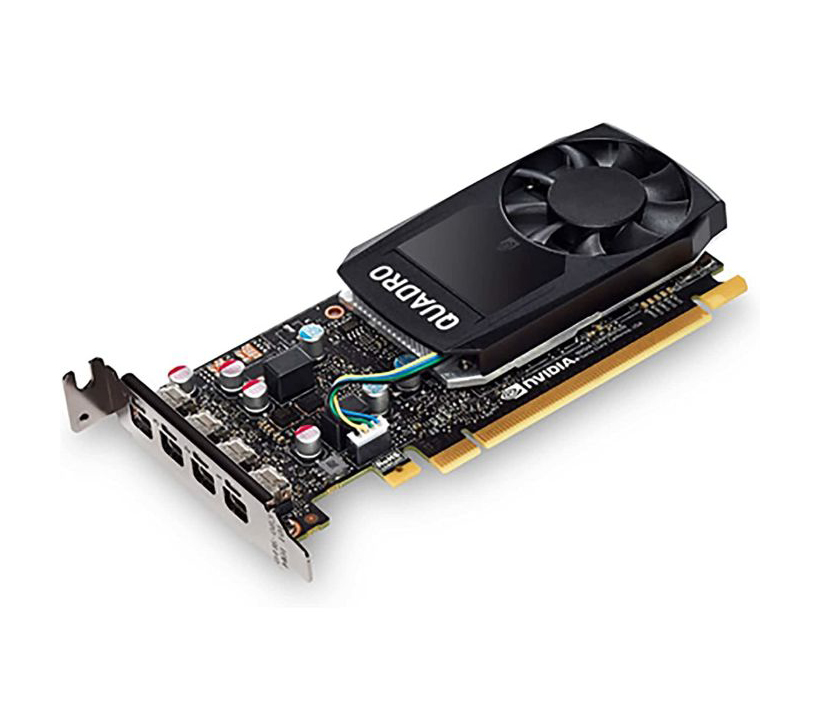
4X67A11584 - Lenovo ThinkSystem NVIDIA Quadro P620 2GB PCIe Active GPU
Product Description
Entry-level NVIDIA Quadro P620 2GB GDDR5 PCIe workstation-class GPU for Lenovo ThinkSystem servers. Supports 4x 4K displays via Mini DisplayPort. Single-slot, active cooling.
Product Overview
The Lenovo ThinkSystem NVIDIA Quadro P620 2GB PCIe Active GPU (MPN: 4X67A11584) is a professional, entry-level graphics adapter designed for installation in supported Lenovo ThinkSystem rack and tower servers. Built on the NVIDIA Pascal architecture, it is intended to provide graphics acceleration and multi-display output for server-based workstation, visualization, and remote graphics workloads rather than gaming. It is a single-slot, low-profile-capable, actively cooled card that connects via PCI Express 3.0 x16 and supports up to four displays simultaneously through Mini DisplayPort 1.4 outputs. Lenovo markets this GPU as a server option (feature code B31D) for select ThinkSystem platforms, primarily suited to basic 2D/3D graphics, CAD viewing, and video wall/multi-monitor output scenarios in a data center environment.
Key Specifications
- Manufacturer: Lenovo
- Product Family: ThinkSystem
- Product Series: GPU Adapters / Options
- Model: NVIDIA Quadro P620
- Lenovo Part Number (MPN): 4X67A11584
- Lenovo Feature Code: B31D
- Product Type: PCIe Graphics Processing Unit (GPU) server option
- GPU Architecture: NVIDIA Pascal
- GPU Memory: 2 GB GDDR5
- Memory Interface: 128-bit
- Memory Bandwidth: Up to 80 GB/s
- NVIDIA CUDA Cores: 512
- System Interface: PCI Express 3.0 x16
- Max Power Consumption: 40 W
- Thermal Solution: Active
- Form Factor: 2.713" H x 5.7" L, Single Slot, Low Profile capable
- Display Connectors: 4x Mini DisplayPort 1.4
- Max Simultaneous Displays: 4 direct, 4x DisplayPort 1.4 Multi-Stream
- Display Resolution: 4x 4096x2160 @ 60 Hz; 4x 5120x2880 @ 60Hz
- Graphics APIs: Shader Model 5.1, OpenGL 4.5, DirectX 12.0, Vulkan 1.0
- Compute APIs: CUDA, DirectCompute, OpenCL
- Controlled GPU (export status): No (per Lenovo Press documentation)
- Operating System Support (server-dependent): Microsoft Windows Server 2016/2019/2022 (and Windows Server 2025 on select newer platforms); Red Hat Enterprise Linux; SUSE Linux Enterprise; Ubuntu — exact OS support varies by host server (see ServerProven)
- Management: Managed via host ThinkSystem server's systems management (e.g., Lenovo XClarity); no GPU-specific management spec published
- Warranty: Follows the warranty terms of the host ThinkSystem server; no standalone warranty period published by Lenovo for this part
Key Features
- NVIDIA Pascal architecture GPU with 512 CUDA cores
- 2 GB dedicated GDDR5 graphics memory
- Single-slot, active-cooled design for compact server chassis
- Four Mini DisplayPort 1.4 outputs for multi-monitor setups
- Supports up to four displays at 4K (4096x2160) @ 60 Hz simultaneously
- PCI Express 3.0 x16 host interface for broad server compatibility
- Low power consumption (40 W max) suited to dense server deployments
- Support for CUDA, DirectCompute, and OpenCL compute APIs
- Compatible with Windows Server and select Linux distributions (server-dependent)
- Officially listed and validated by Lenovo for specific ThinkSystem server models
Application & Use Cases
This GPU is used to add graphics processing and multi-display output capability to compatible Lenovo ThinkSystem servers.
- Server-based CAD/2D-3D visualization workloads
- Multi-monitor digital signage or video wall driving from a server
- Basic remote graphics/virtual desktop infrastructure (VDI) acceleration
- Entry-level professional graphics rendering in a data center environment
- Adding display output capability to headless or rack-mounted servers
Benefits
- Adds professional GPU output to ThinkSystem servers
- Drives up to 4 displays from one card
- Low 40W power draw suits dense deployments
- Compact single-slot design saves chassis space
- Actively cooled for reliable server operation
- Officially validated for select ThinkSystem models
Interfaces
| Interface Type | Details |
|---|---|
| Host Interface | PCI Express 3.0 x16 |
| Display Outputs | 4x Mini DisplayPort 1.4 |
| Max Displays Supported | 4 (direct or via DisplayPort 1.4 Multi-Stream) |
Physical Characteristics
- Form Factor: Single Slot, Low Profile capable
- Dimensions: 2.713" (H) x 5.7" (L) (per NVIDIA reference datasheet; Lenovo-branded card dimensions not separately published)
- Weight: Not specified by manufacturer
- Cooling: Active (fan-based)
Compatibility
Per Lenovo's official ServerProven compatibility tool, this GPU (4X67A11584) is validated for the following ThinkSystem servers:
- ThinkSystem SR250
- ThinkSystem SR630 (including SP2 and V2)
- ThinkSystem SR635
- ThinkSystem SR645
- ThinkSystem SR650 (including SP2 and V2)
- ThinkSystem SR655
- ThinkSystem SR665
- ThinkSystem ST250
- ThinkSystem ST50
- ThinkSystem ST550 (including SP2)
- ThinkSystem ST650 V2
Note: Newer ThinkSystem V3/V4 generation servers (per Lenovo Press LP0768, updated June 30, 2026) do not list official support for this GPU.
- Price
- $146.00
- Brand
- Lenovo
- Sku
- 4X67A11584
- Status
- Available
An entry-level ThinkSystem GPU delivering four 4K Mini DisplayPort outputs and validated Quadro P620 graphics for compact server chassis. Lenovo option part number 4X67A11584.
Specifications
- GPU: NVIDIA Quadro P620, Pascal architecture, 512 CUDA cores.
- Memory: 2GB GDDR5, 128-bit interface, 80 GB/s bandwidth.
- Interface and form factor: PCIe 3.0 x16, single-slot low-profile board (2.7 in high x 5.7 in long) with active fan.
- Display outputs: 4x Mini DisplayPort 1.4, driving up to four 4K displays.
- Power: approximately 40W total board power, no auxiliary power connector required.
Pros
- Ordering by Lenovo part number removes compatibility guesswork and keeps the GPU inside your existing workstation support entitlement.
- Kit packaging includes the correct bracket and accessories, so installation into a validated chassis is straightforward and repeatable.
Cons
- Part-number-specific stock can be harder to source than generic retail cards, particularly once the platform reaches end of sale.
- Performance sits behind current-generation professional cards, so it suits standardization and replacement more than a raw performance upgrade.
2. 4X60F17422 – Lenovo NVIDIA NVS 315 1GB DDR3 DMS-59 PCIe 2.0 x16 Graphics Card for ThinkServer
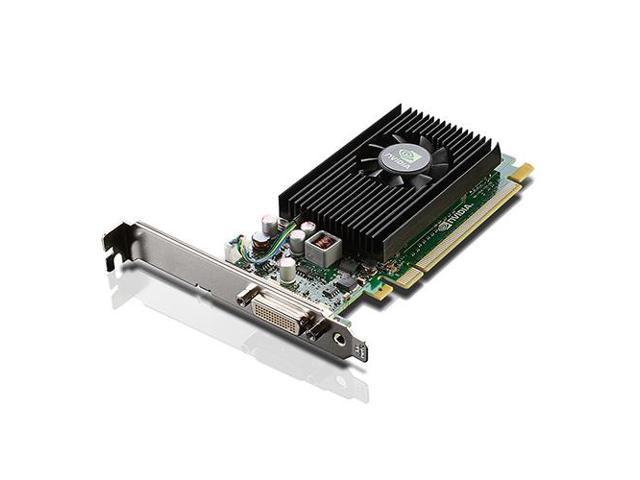
4X60F17422 - Lenovo NVidia NVS 315 1GB DDR3 64-Bit DMS-59/Dual DisplayPort/Dual DVI-I PCI Express 2.0 x16 Video Graphics Card for ThinkServer
- Price
- $0.00
- Brand
- Lenovo
- Sku
- 4X60F17422
- Status
- Available
A refurbished multi-display card that drives two 2560×1600 screens from a single DMS-59 port in half-height ThinkStation and ThinkServer chassis. Lenovo option part number 4X60F17422.
Specifications
- GPU: NVIDIA NVS 315, 48 CUDA cores, active cooling.
- Memory: 1GB GDDR3, 64-bit interface, 14 GB/s bandwidth.
- Interface and form factor: PCIe 2.0 x16, half-height/half-length single-slot board.
- Display outputs: 1x DMS-59, supplied with dual DVI-I and dual DisplayPort dongles, driving displays up to 2560×1600.
- Power:5W typical, bus-powered with no auxiliary connector; DirectX 11 and OpenGL 4.1 support.
Pros
- Extremely low 19.5W draw and half-height form factor make it a safe display-output upgrade for compact, low-wattage office workstations.
- DMS-59 dongles connect legacy DVI and DisplayPort monitor estates, preserving existing cables and display infrastructure during a workstation refresh.
Cons
- Only 1GB of GDDR3 and 48 CUDA cores, so it suits 2D output duties rather than modeling or rendering workloads.
- Refurbished end-of-life product with frozen driver branches, so newer applications and operating systems carry real long-term support risk.
3. 4X60N86660 – Lenovo NVIDIA Quadro P1000 4GB GDDR5 Low-Profile Graphics Card
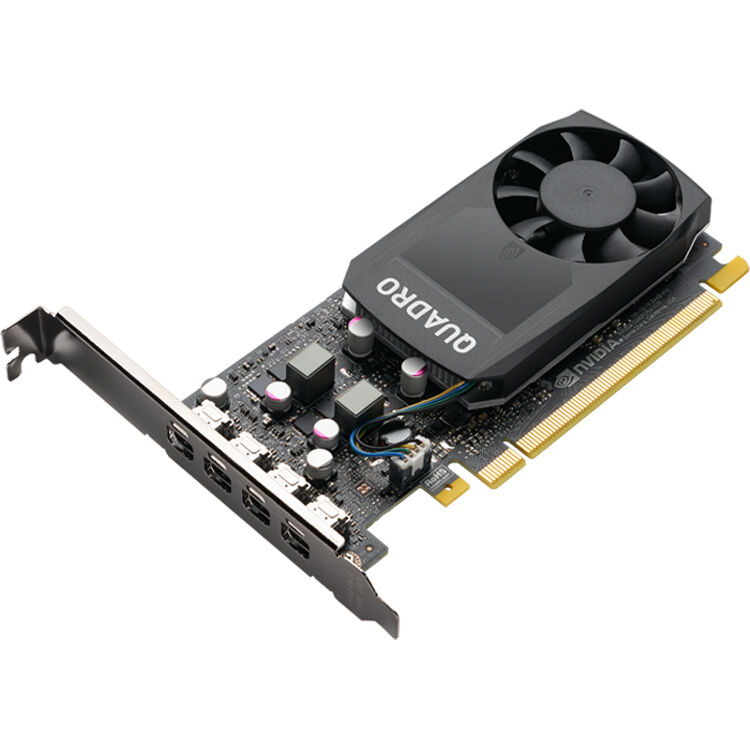
4X60N86660 - Lenovo Quadro P1000 Graphic Card 4GB GDDR5 Low-profile 4 x Mini DisplayPor
- Price
- $137.88
- Brand
- Lenovo
- Sku
- 4X60N86660
- Status
- Available
A low-profile Pascal card pairing 4GB of GDDR5 with four Mini DisplayPort outputs for entry-level CAD and multi-monitor workstation duty. Lenovo option part number 4X60N86660.
Specifications
- GPU: NVIDIA Quadro P1000, Pascal architecture, 640 CUDA cores.
- Memory: 4GB GDDR5, 128-bit interface, 82 GB/s bandwidth.
- Interface and form factor: PCIe 3.0 x16, single-slot low-profile board with active cooling.
- Display outputs: 4x Mini DisplayPort 1.4, driving up to four displays at 5120×2880.
- Power: approximately 47W total board power, bus-powered with no auxiliary connector.
Pros
- Four 5K-capable outputs and 4GB of memory in a low-profile board, ideal for dense multi-monitor drafting and dashboard workstations.
- Bus-powered at roughly 47W, so it installs in small-form-factor ThinkStation systems without any power supply upgrade or supplementary connectors.
Cons
- Pascal-generation silicon lacks RT and Tensor cores, so ray-traced previews and GPU-accelerated AI features are unavailable on this card.
- 4GB of GDDR5 constrains large assemblies, high-resolution textures, and 4K video timelines that modern professional applications now routinely produce.
4. 4X61J52234 – Lenovo NVIDIA T400 4GB GDDR6 mini-DP Graphics Card
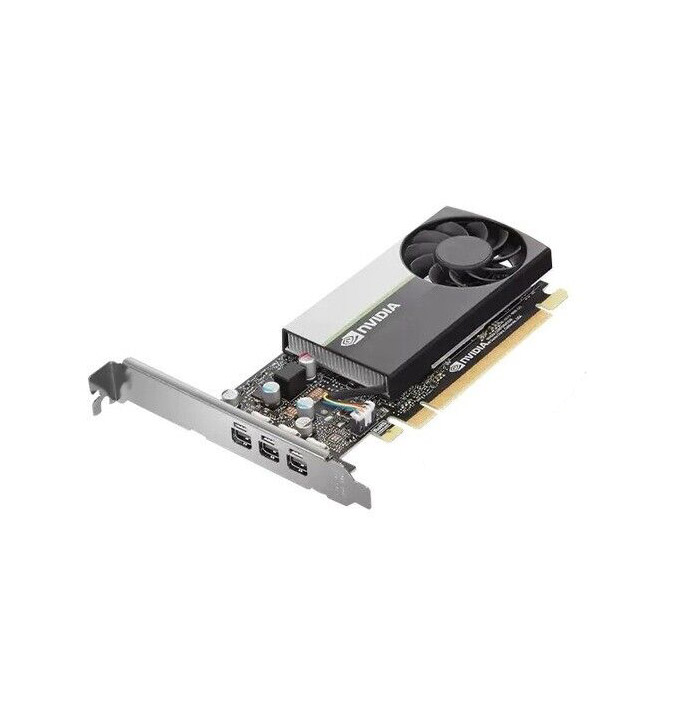
4X61J52234 - Lenovo Graphic_Bo Nv T400 4G Card
- Price
- $0.00
- Brand
- Lenovo
- Sku
- 4X61J52234
- Status
- Available
Lenovo’s smallest Turing-generation card, offering three Mini DisplayPort outputs and 4GB of GDDR6 for entry-level professional display work. Lenovo option part number 4X61J52234.
Specifications
- GPU: NVIDIA T400, Turing architecture, 384 CUDA cores.
- Memory: 4GB GDDR6, 64-bit interface, 80 GB/s bandwidth.
- Interface and form factor: PCIe 3.0 x16, single-slot low-profile with half-height and full-height brackets.
- Display outputs: 3x Mini DisplayPort 1.4, driving up to three 5K displays.
- Power: approximately 30W total board power, bus-powered with no auxiliary connector.
Pros
- At roughly 30W, it is the lowest-power certified option here, fitting thermally constrained small-form-factor ThinkStation and ThinkCentre deployments.
- Turing drivers remain certified for mainstream CAD and design applications, giving low-cost professional stability for drafting and viewing workloads.
Cons
- Three outputs and a 64-bit memory bus limit it to modest multi-monitor setups rather than four-screen or high-bandwidth configurations.
- 384 CUDA cores deliver only entry-level throughput, so shaded 3D viewports and rendering tasks quickly outgrow the card’s capability.
5. 4X61J52233 – Lenovo NVIDIA T1000 8GB mini-DP x4 GDDR6 Graphics Card
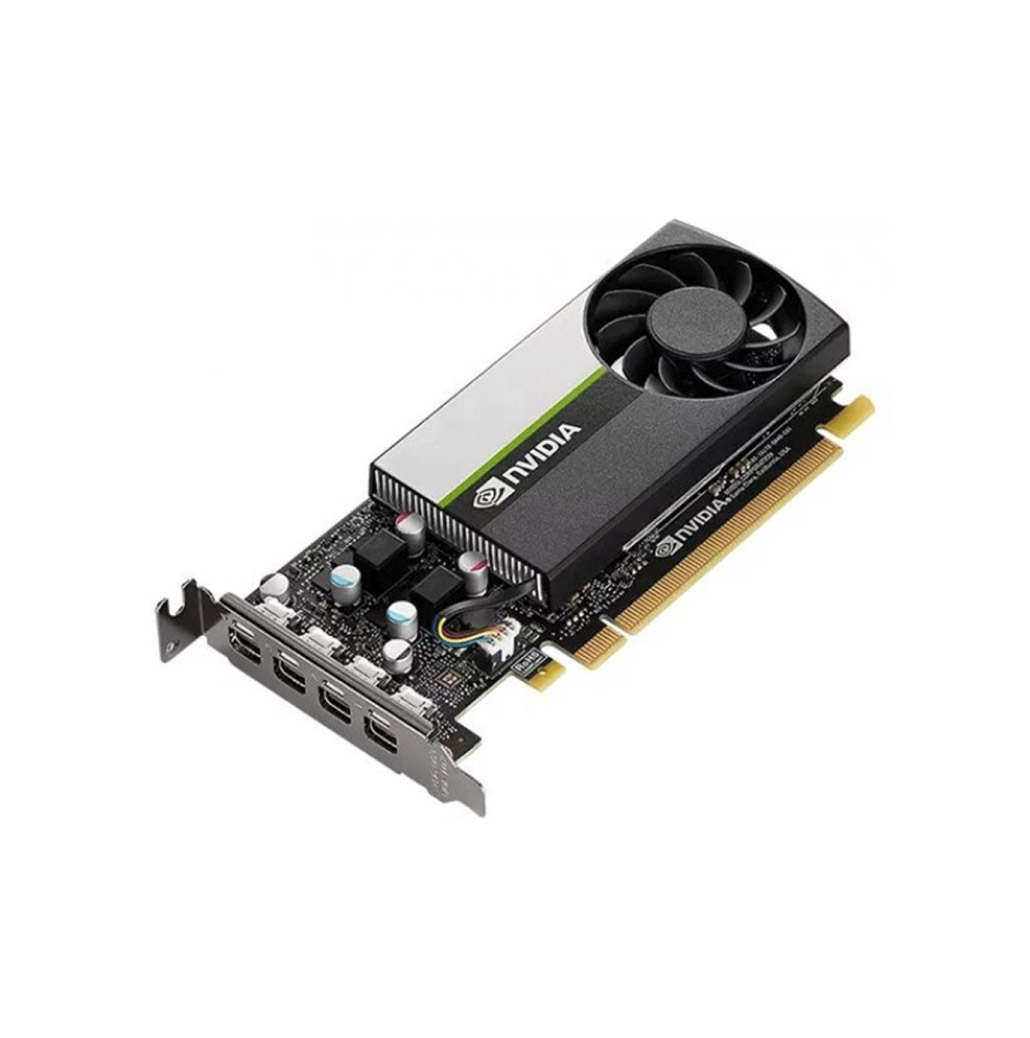
4X61J52233 - Lenovo Graphic_Bo Nv 1000 8G Card
- Price
- $440.52
- Brand
- Lenovo
- Sku
- 4X61J52233
- Status
- Available
A dependable low-profile card for multi-display CAD and drafting where certified stability matters more than ray-tracing performance. Lenovo option part number 4X61J52233.
Specifications
- GPU: NVIDIA T1000, Turing architecture, 896 CUDA cores, no RT or Tensor cores.
- Memory: 8GB GDDR6, 128-bit interface, 160 GB/s bandwidth.
- Interface and form factor: PCIe 3.0 x16, single-slot low-profile with both brackets supplied.
- Display outputs: 4x Mini DisplayPort 1.4.
- Power: approximately 50W total board power, bus-powered with no auxiliary connector.
Pros
- Mature, widely certified drivers make it a low-risk standardization choice across mixed fleets of older ThinkStation workstations.
- 8GB of memory and four outputs support demanding multi-monitor drafting setups at a modest acquisition cost.
Cons
- No RT cores, so ray-traced previews and GPU-accelerated rendering fall well behind Ampere and Ada equivalents.
- Turing-generation product nearing the end of its lifecycle, which shortens the remaining certified driver support runway.
6. 4X60M41869 – Lenovo NVIDIA Quadro K1200 4GB GDDR5 mini-DP x4 Graphics Card
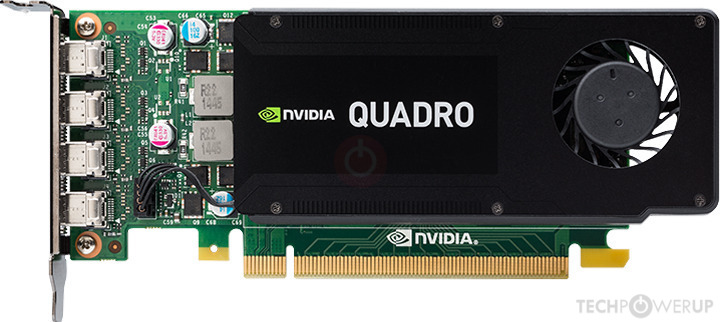
4X60M41869 - Lenovo Nvidia Quadro K1200 4GB DDR5 / 4x Mini DisplayPort / PCI-Express 2.0 Video Graphics Card
- Price
- $0.00
- Brand
- Lenovo
- Sku
- 4X60M41869
- Status
- Available
A refurbished low-profile Maxwell card driving four 4K Mini DisplayPort screens on 45W for ThinkStation drafting and visualization workstations. Lenovo option part number 4X60M41869.
Specifications
- GPU: NVIDIA Quadro K1200, Maxwell architecture, 512 CUDA cores.
- Memory: 4GB GDDR5, 128-bit interface, 80 GB/s bandwidth.
- Interface and form factor: PCIe 2.0 x16, single-slot low-profile board (169.9 mm long) with active cooling.
- Display outputs: 4x Mini DisplayPort 1.2, driving up to four displays at 3840×2160.
- Power: 45W maximum board power, bus-powered with no auxiliary connector; DirectX 12 and OpenGL 4.5 support.
Pros
- Fully qualified on ThinkStation systems and bus-powered at 45W, so it drops into low-wattage small-form-factor chassis without any power upgrade.
- Four Mini DisplayPort 1.2 outputs drive four 4K displays, giving refurbished-budget multi-monitor capability across drafting and control-room deployments.
Cons
- Maxwell-generation silicon and a PCIe 2.0 interface place it well behind Turing and Ampere cards in sustained professional throughput.
- Refurbished end-of-life hardware with a closing certified driver window, so long-term application and operating system support carries real risk.
How to Identify Your Lenovo Graphics Card by Part Number?
Lenovo graphics cards have two identifiers: a Lenovo part number and the GPU vendor’s own model. Quote the Lenovo number, usually printed on the card or its box, when ordering a spare, as it maps to a specific card configuration, bracket, and accessory bundle.
You can find these details in Windows Device Manager, the NVIDIA Control Panel, Lenovo Vantage, or Lenovo System Update. If the machine does not boot, read the label on the card’s PCB or cooler shroud instead, and photograph it along with the PCIe power connectors.
Always check the part number you find against your workstation’s Product Specification Reference before you buy, especially when every machine in a standardized fleet must run identical hardware.
When Should You Upgrade Your Lenovo Workstation Graphics Card?
Five practical signals tell you a Lenovo GPU upgrade is overdue. If any of them describes your daily workflow, the card is now limiting productivity rather than supporting it.
1. Your Viewport Performance Is Slowing You Down
If assemblies stutter as you rotate them, previews lag, or you routinely simplify models to keep working, the GPU is costing you billable hours every day.
2. You Are Running Out of VRAM
Out-of-memory errors, forced texture downscaling, or renders that fail on large scenes are clear signals that your card’s memory capacity is now the limiting factor.
3. Your Workload Has Changed
Moving from 2D drafting into 3D modeling, GPU rendering, 4K video, or AI-assisted design shifts requirements enough to justify a full Lenovo GPU upgrade.
4. Driver or Certification Support Has Ended
Once a card leaves its certified driver branch, new application and operating system releases become a support risk you cannot escalate to your software vendor.
5. You Need More or Newer Display Outputs
Adding high-resolution or high-refresh monitors, or moving to DisplayPort 2.1, often requires a newer card even when compute performance is still adequate.
If two or more of these signals apply, plan the upgrade now rather than next budget cycle. Confirm compatibility first, then choose the tier that matches your current workload.
Final Thoughts
Choosing a Lenovo workstation graphics card is a matter of matching three things: the performance your applications actually need, the VRAM your datasets demand, and the physical, power, and driver constraints of the workstation in front of you. Get those three right, and the card will serve you reliably for years.
Resist the temptation to buy purely on benchmark numbers. Certified drivers, a validated part number, and a form factor that fits your chassis deliver more day-to-day value than raw throughput you cannot cool or power. For most teams, a well-chosen mid-range professional graphics card is the sweet spot, and refurbished stock extends that budget across more machines.
Ready to upgrade? Explore Lenovo Workstation Graphics Cards or view other Lenovo graphics card options to find the certified card that fits your workstation, workload, and budget. For more information, contact our expert team or request your bulk quote today!
Frequently Asked Questions
- How do I know which graphics card is compatible with my Lenovo workstation?
Check your model’s Product Specification Reference for supported cards, then confirm slot type, clearance, power connectors, and bracket height match your chassis.
- Can I upgrade the graphics card in a Lenovo workstation?
Yes. Most ThinkStation desktops accept a user-installable PCIe upgrade, provided the card fits the chassis and the power supply support it.
- Are refurbished Lenovo graphics cards worth buying?
Often yes. Certified professional cards retain performance well, so refurbished units offer strong value when bought with a warranty and return policy.
- How much VRAM do I need?
4GB for office and 2D work, 8-16GB for CAD and 4K video, and 24GB or more for simulation and rendering.
- What should I check before buying a replacement Lenovo GPU?
Verify part number, PCIe slot and clearance, power connectors and wattage, physical dimensions, operating system support, and certified driver availability for your applications.
Categories


tags

Expert team support
We accept POs from fortune 1000 companies, government agencies, defense, schools and hospitals.
Do you need advice on buying or selling hardware? Fill out the form and we will return.

Sales & Support
(855) 483-7810
We respond within 48 hours on all weekdays
Opening hours
Monday to thursday: 08.30-16.30
Friday: 08.30-15.30



